Although building your own homelab is a lot of fun and can be one of the most fulfilling adventures a self-hosting enthusiast can undertake, sometimes we need a different kind of adventure. For our real-life journeys, we can bring the same self-hosting approach to our travel records, from weekend hikes to cross-continental road trips. While countless cloud-based services offer to track your travels, for the self-hosting enthusiast, the ultimate adventure is building your own digital archive. Enter AdventureLog, a self-hosted application designed to be the perfect companion for adventurers who want to own their data and customize their experience.
What is AdventureLog and How Does it Work?
AdventureLog is an open-source web application that allows you to create a personal travel blog and an interactive map of your adventures. Think of it as your own private, self-hosted version of popular travel tracking apps, but with the freedom and control that comes with running it on your own server.
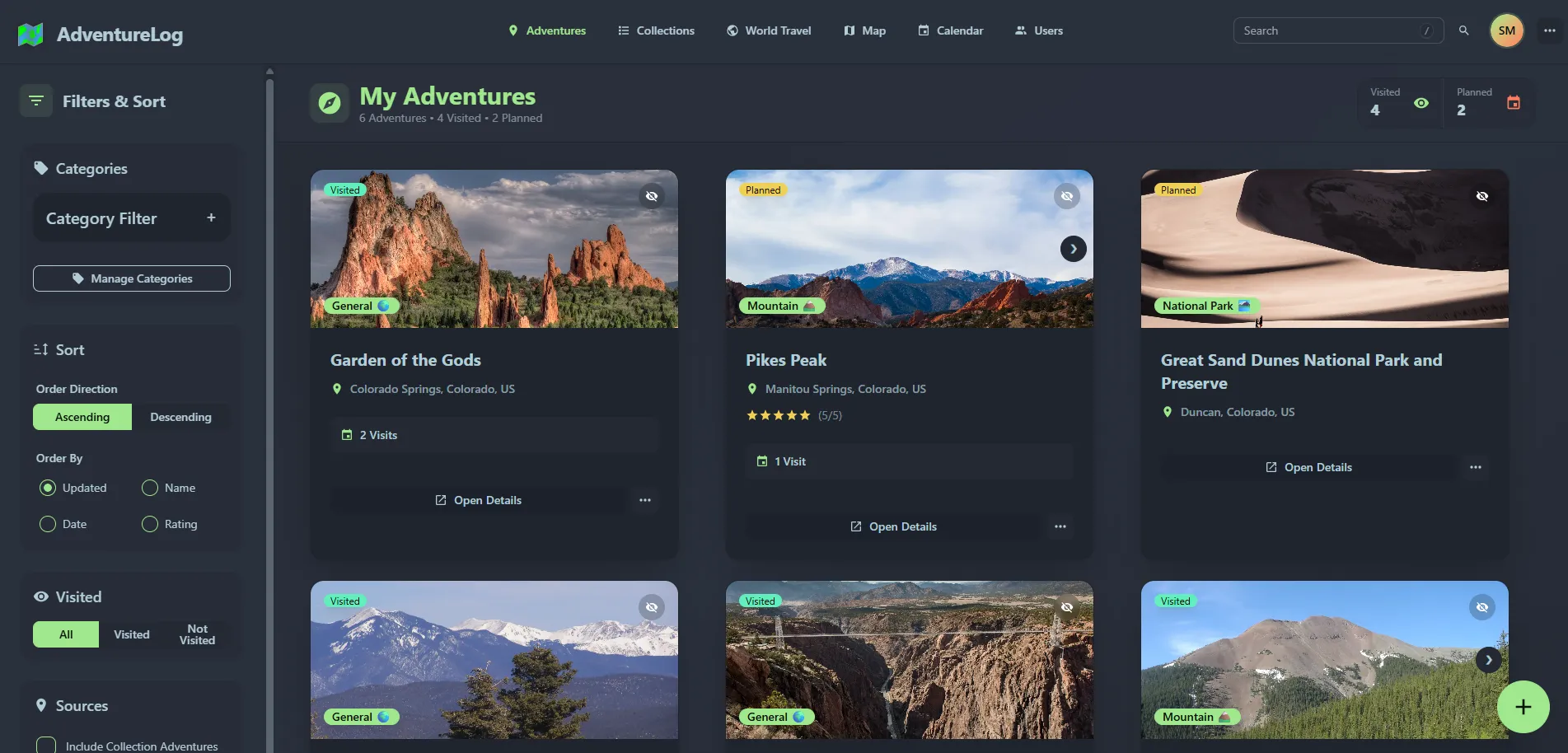
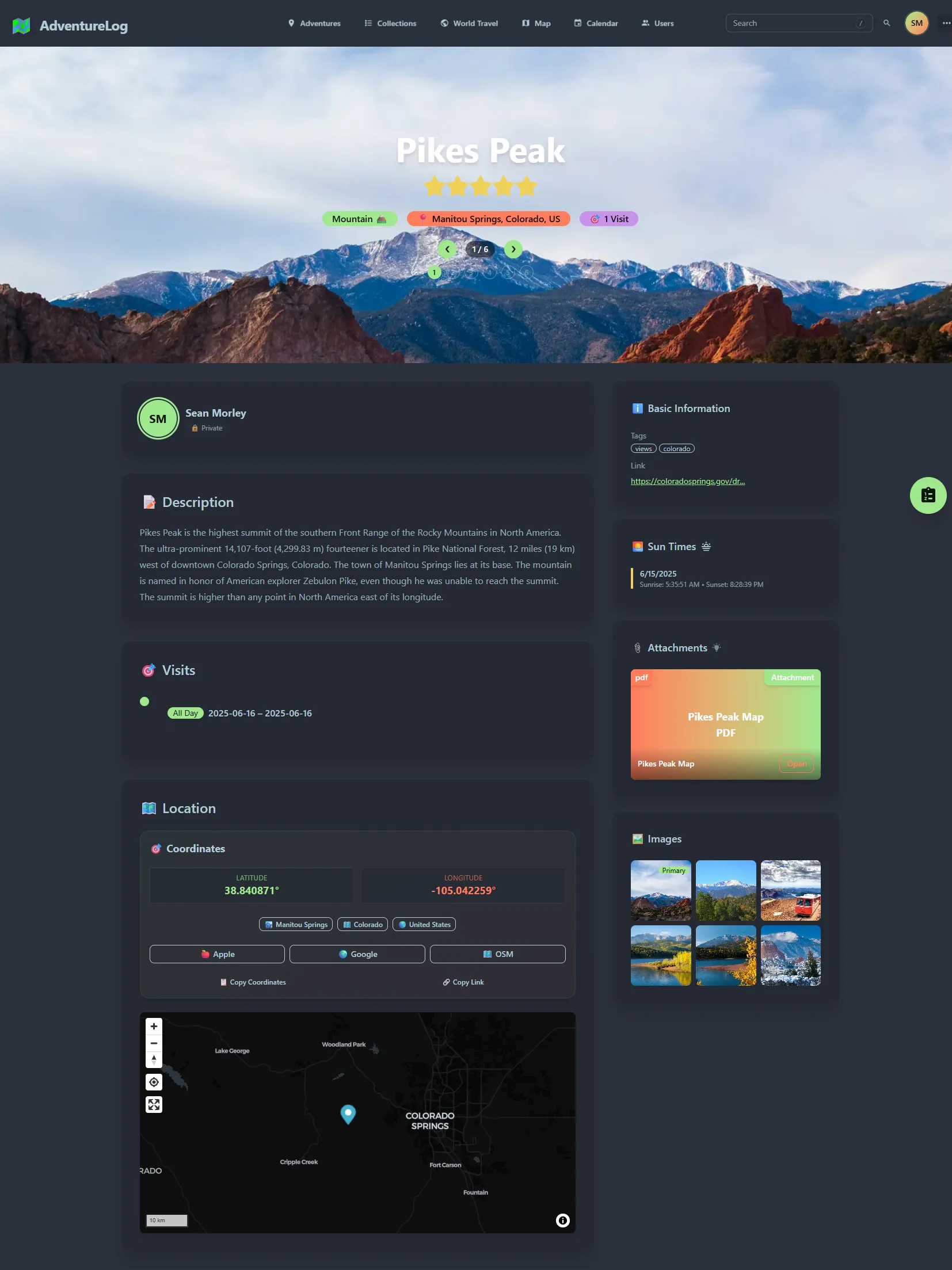
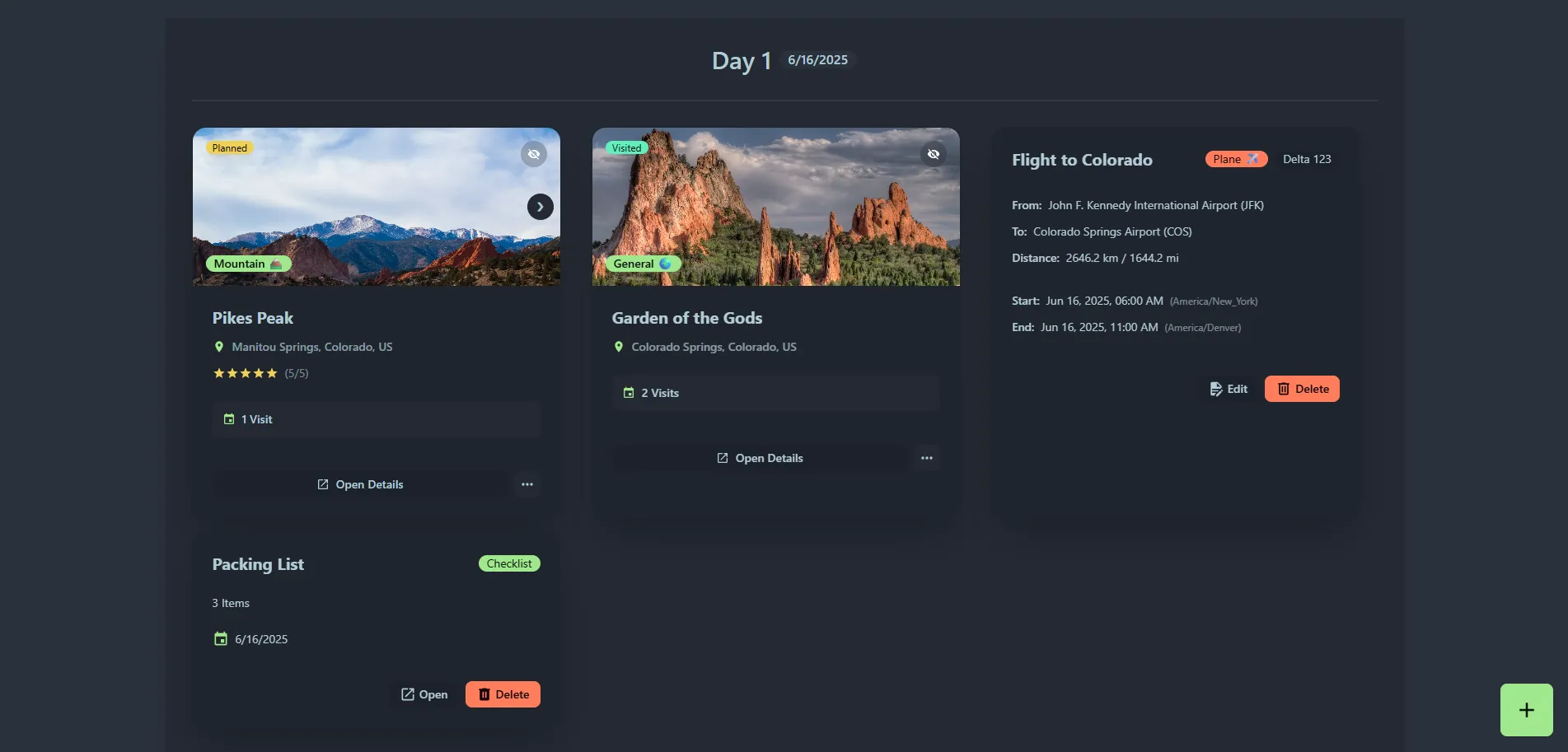
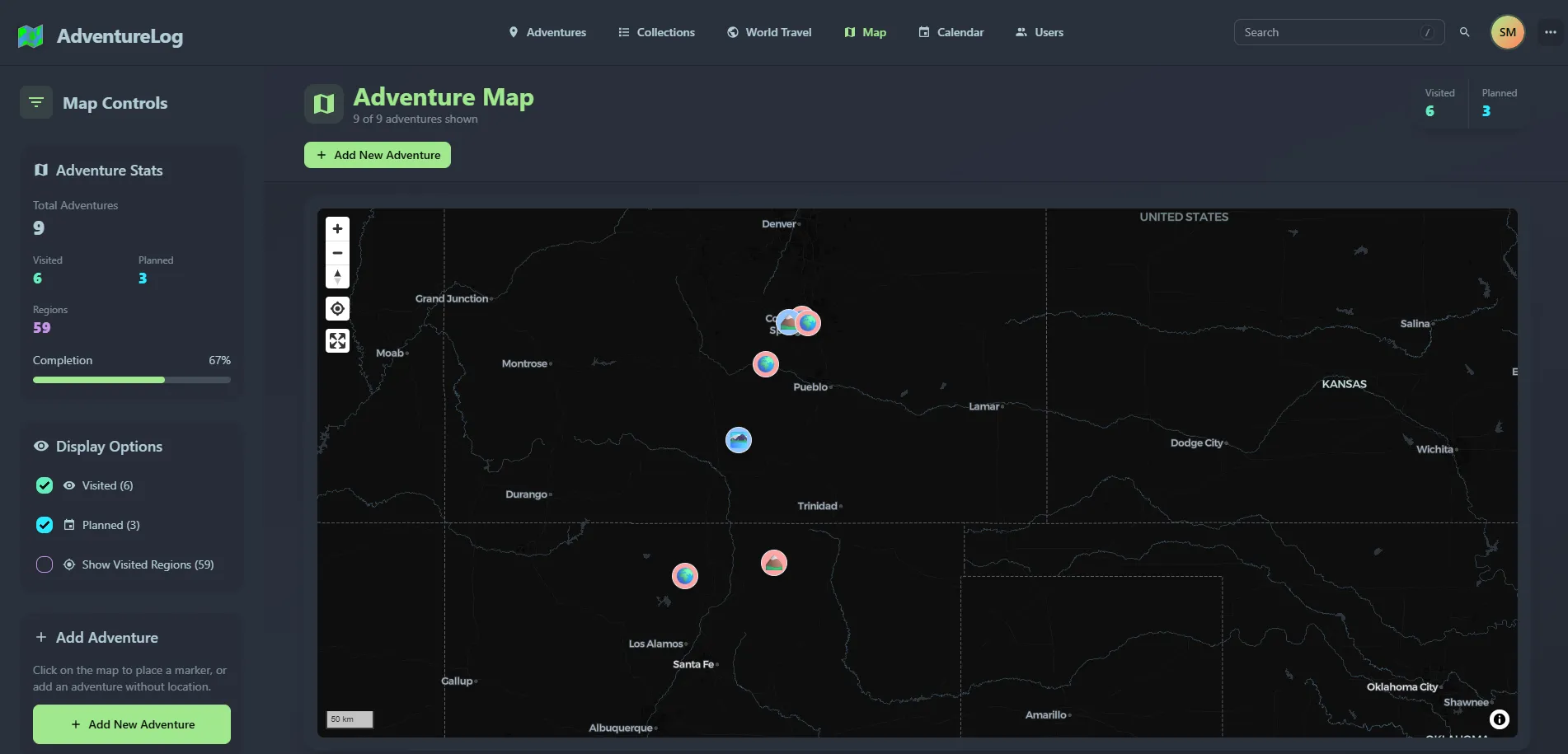
The screenshots show the June 2025 interface using the term "Adventures." Current versions call these records Locations: places you have visited or want to visit. A location can have images, notes and repeated visits; a dated collection groups locations into a trip or itinerary. Activities can include GPX route data, entered or imported through supported workflows. This separates a place, a visit and a traveled route instead of treating every map pin as continuous GPS tracking.
Key Features of AdventureLog: A Deep Dive
AdventureLog is packed with features that cater specifically to the needs of a traveling storyteller:
- A Stunning Interactive Map: This is arguably the crown jewel of AdventureLog. The application leverages the power of OpenStreetMap to display an interactive map of your travels. Locations appear as map pins, while activity tracks can show a recorded path when GPX data is available. An itinerary linking planned places is not proof that you traveled that exact route. Choose the display that matches the information you recorded. It transforms a simple log into an engaging and explorable narrative of your adventures.
- Rich Text and Markdown Support: Your stories deserve to be told with more than just plain text. AdventureLog supports Markdown, allowing you to format your entries with headings, lists, bold and italic text, and even embed links. This makes for a much more readable and engaging travelogue.
- Image Uploads: What's a travel log without photos? AdventureLog allows you to upload images and associate them with specific adventures, enriching your digital memories.
- Beautiful Image Galleries: Galleries bring together photographs associated with a location. Image processing and browsing still use server resources, so test your own phone formats, upload limits and gallery size rather than assuming unlimited optimization at no cost.
- Full Data Ownership and Privacy: In an era of data breaches and ever-changing terms of service on commercial platforms, self-hosting gives you peace of mind. With AdventureLog, your travel data, including your location history and personal photos, resides on your own server. You administer account and sharing permissions. Public collections, externally linked photos, geocoding and map services still need consideration; self-hosting does not automatically keep every browser request inside your network.
- Clean and Responsive User Interface: The web interface is modern, clean, and easy to navigate. It's designed to be responsive, meaning it works just as well on your phone or tablet as it does on a desktop computer. This is crucial for logging your adventures on the go.
- GPX Track Display: For the avid hikers, cyclists, and trekkers, AdventureLog allows you to upload and display GPX tracks on your map. This lets you visualize your exact path and share the intricacies of your routes with friends and family.
- Unlimited Adventures and Logs: Being self-hosted means you are not bound by the limitations of a subscription service. The project can be self-hosted without a subscription, but capacity depends on more than free disk space: database size, image processing, memory and backup time also matter.
- User Management: You can create multiple user accounts, making it a great solution for families or groups of friends who want to share a single instance while keeping their adventures separate.
Installing AdventureLog in Your Homelab
Getting AdventureLog up and running in your homelab is a straightforward process, thanks to its reliance on Docker. This containerized approach simplifies deployment and ensures that the application runs in a consistent and isolated environment.
The deployment layout has evolved since this article's June 2025 publication. The older three-service setup separated SvelteKit, Django and PostGIS; that remains an advanced deployment option. The current standard deployment bundles frontend and backend in one application container, alongside a separate database container. Do not mix an old frontend/backend environment example with the newer combined image.
Download the matching publisher Compose file and environment example from the project repository, inspect them, and create your own .env in a new deployment directory. The standard stack maps host port 8015 to application port 80 by default. Set SITE_URL to the address clients will actually use; leaving localhost is unsuitable for other devices. A public HTTPS URL requires a correctly configured TLS endpoint, rather than simply setting the variable.
Choose a unique database password and set strong first-boot administrator credentials. The example ships with admin/admin, which must not remain the login for a reachable instance. For a private family journal, review registration and sharing settings before inviting anyone; the supplied example enables registration. Keep the environment file out of public repositories because it contains credentials.
After completing the matching publisher configuration, validate and start the standard stack:
docker compose --env-file .env config --quiet
docker compose --env-file .env up -d
docker compose --env-file .env ps
docker compose --env-file .env logs --tail=100 app
These commands assume the standard file's app service. An advanced stack has different service names and a separate environment file. Pin compatible release images for a repeatable deployment rather than assuming the rolling latest tag will preserve today's behavior. Container startup alone does not prove login, uploads or generated image URLs work.
On the first visit, create one private location, add a sample photo and a visit, and reopen them from a second device. Confirm that an anonymous browser cannot see that private material. If you use an external reverse proxy, test the final HTTPS address as well as the local service: incorrect origins or backend URLs can allow the home page to load while login or images fail. A private VPN is also an option for accessing a personal journal away from home.
The Interactive Map: Your World at a Glance
AdventureLog's map integration is what truly brings your travels to life. It utilizes the power of OpenStreetMap, a collaborative and open-source map of the world. Open map data and a hosted map service are separate things. AdventureLog can use external map and geocoding providers; the v0.13 release introduced a provider framework covering OpenStreetMap and Google Maps. Check your chosen provider, attribution and connectivity instead of assuming the entire map is served from your own machine.
The interactive map allows you to:
- Visualize Your Journeys: See your entire travel history laid out on a world map.
- Explore Individual Adventures: Zoom in on specific adventures to see the detailed path you took.
- Inspect Log Points: Click on individual markers on the map to view the timestamp, coordinates, and any notes you've added for that location.
This visualization turns a list of places into an engaging travel record. If a configured layer uses the public OpenStreetMap raster service, follow its tile usage policy: availability is best effort, and bulk offline prefetching is not permitted. An open-data licence is not a promise of unrestricted free hosted tiles.
Alternatives to a Self-Hosted AdventureLog
While AdventureLog is an excellent self-hosted solution, it's always good to be aware of the alternatives.
Other Self-Hosted Options:
- PhotoPrism: While primarily a photo management application, PhotoPrism has powerful map features that automatically plot your photos based on their EXIF data. It's a great choice if your focus is more on the visual aspect of your travels.
- Traccar: For the more technically advanced user, Traccar is a powerful GPS tracking platform. It's less focused on the "blog" aspect and more on real-time and historical location tracking of devices.
Cloud-Based Alternatives:
- Polarsteps: A hosted travel-journaling option to compare if you prefer less server administration. Check its current tracking, export and privacy settings against your needs.
- FindPenguins: Another hosted travel-journaling option. Compare how it handles sharing, data export and the amount of manual curation you prefer.
- Google My Maps: A versatile tool that allows you to create custom maps with your own placemarks, routes, and photos.
Conclusion: Your Adventure, Your Data, Your Way
AdventureLog strikes a fantastic balance between user-friendliness and the robust control that homelab enthusiasts crave. It offers a beautiful and interactive way to document your life's journeys, while giving you control over the journal you host. With its straightforward Docker-based installation and a solid set of features, AdventureLog is a rewarding project to try in your homelab, ready to chronicle your next great adventure once configuration and recovery have been checked. So fire up your server, deploy the container, and start building a digital testament to your explorations.
Immich integration and World Travel records
The Immich integration lets you select library images or album photos from AdventureLog. The integration guide lists the required API permissions and server URL format. Use a dedicated API key with the documented read permissions, keep it private and revoke it when the integration is retired. A container's localhost address refers to that container, not automatically to another photo server.
Linking a photo service is not a backup of its library. Check whether the records depend on Immich references or contain their own stored files, then include the relevant systems in your recovery plan. Test one image and album before importing an entire holiday; incompatible API versions, unsupported formats or a URL that only works on the host can cause partial failures.
World Travel records countries, regions and cities you have visited. Its statistics reflect the application's geographic dataset and your recorded visits, rather than an authoritative count of every possible subdivision on Earth. Do not treat an empty region list as proof that your trip was lost or run an old backend-container command against a different deployment layout. Match any maintenance command to the installed release and current documentation.
Which type of travel tool fits your records?
| Tool | Main focus to compare |
|---|---|
| AdventureLog | Curated locations, visits, trip collections, photos and itineraries. |
| Dawarich | Location-history timelines and trips using imported or recorded points. |
| Wanderer | A self-hosted trail database for organizing outdoor routes. |
| OwnTracks | Phone apps that publish location updates to a chosen backend. |
These tools can complement one another. Decide whether you want a carefully written travel journal, continuous location history or a library of trails; they are different workflows. Compare actual import/export formats and permissions instead of choosing solely from a backend-language table.
Protecting and restoring your travel journal
AdventureLog's operations guide documents a backup containing the environment file, a PostgreSQL dump and a media archive. Keep an independent protected copy outside the server and test restoring it to an isolated deployment. If media is stored in an external object store, include that storage in the plan instead of assuming the local media volume contains everything.
Review a trip before making it public. GPS tracks and photo metadata can reveal a home address, a repeated routine or other people's locations. A useful journal can describe the route and experience without sharing precise private starting points. Keep original trip photos independently, record which version produced your backup, and read release notes before upgrading. The v0.13 notes cover deployment and sharing changes; the existing screenshots remain examples of the earlier interface rather than promises of an identical current menu.