If you have ever been in a situation where an idea strikes and there is nowhere to take down the idea, you would also have felt that nagging realisation that the idea will probably be lost forever in the void of forgetfulness. For many, a reliable note-taking app is the key to staying organized and productive. But what if you're not comfortable entrusting your digital brain to a third-party service? What if you crave the control and privacy that comes with hosting your own tools? If this sounds like you, then welcome to the world of self-hosting, and allow us to introduce you to a compelling new player in the note-taking arena: Blinko.
For those of us running our own homelabs, the quest for the perfect self-hosted applications is a perpetual journey. We have a full series on building your own homelab that will take you through the entire process, step-by-step, for those interested but don't know where to start. We've explored some of the established names in the open-source note-taking world. We've delved into the hierarchical depths of TriliumNext, a powerful knowledge base with a focus on interconnected thoughts. We've also navigated the versatile and widely-used Joplin Notes, known for its cross-platform availability and robust synchronization options. Both are excellent tools, offering a high degree of control and a wealth of features. However, our search for an even more intuitive and, dare we say, enjoyable self-hosted note-taking experience led us to Blinko.
What is Blinko and How Does it Tame the Chaos?
At its core, Blinko is an open-source, self-hostable note-taking application designed with simplicity and ease of use in mind, even for those who aren't tech wizards. Think of it as your personal digital notepad, always accessible and entirely under your control. It's built with modern technologies, making it responsive and a pleasure to interact with.
The beauty of Blinko lies in its straightforward approach. You can quickly capture your thoughts as they arise, without getting bogged down in complex formatting or a steep learning curve. But don't let its simplicity fool you; Blinko packs a punch when it comes to features that matter for a self-hosted setup.
The self-hosting aspect is where Blinko truly shines for homelab enthusiasts. With the ability to run Blinko on your own server, you retain complete ownership of your data. You choose access rules and where notes are stored. Hosting and optional cloud AI can still cost money, and privacy depends on configuration and the security of clients, server and backups. For many, setting up Blinko can be as simple as deploying a Docker container, making it accessible even for those relatively new to the world of self-hosting.
Blinko's Arsenal: Features for Your Homelab Haven
Blinko isn't just about basic note-taking; it comes equipped with a thoughtful set of features designed to enhance your workflow, especially in a self-hosted environment:
- Open Source at its Heart: Transparency and community are key in the self-hosting world. Blinko's open-source nature means you can inspect its code, contribute to its development, and be part of a growing community.
- Effortless Self-Hosting: As mentioned, Blinko is designed with self-hosting in mind. Docker images are readily available, making deployment on your homelab a breeze. There are even guides for setting it up on popular platforms like Synology NAS.
- AI-Powered Insights (On Your Terms): One of Blinko's standout features is its integration with AI. Blinko allows you to connect to your own self-hosted AI models, such as Ollama, or use configured external providers. This means you can leverage the power of AI for things like summarizing notes or even chatting with your knowledge base, within your own network when every required provider is local. Check both chat and embedding settings; choosing a local chat model alone does not prove embeddings stay local.
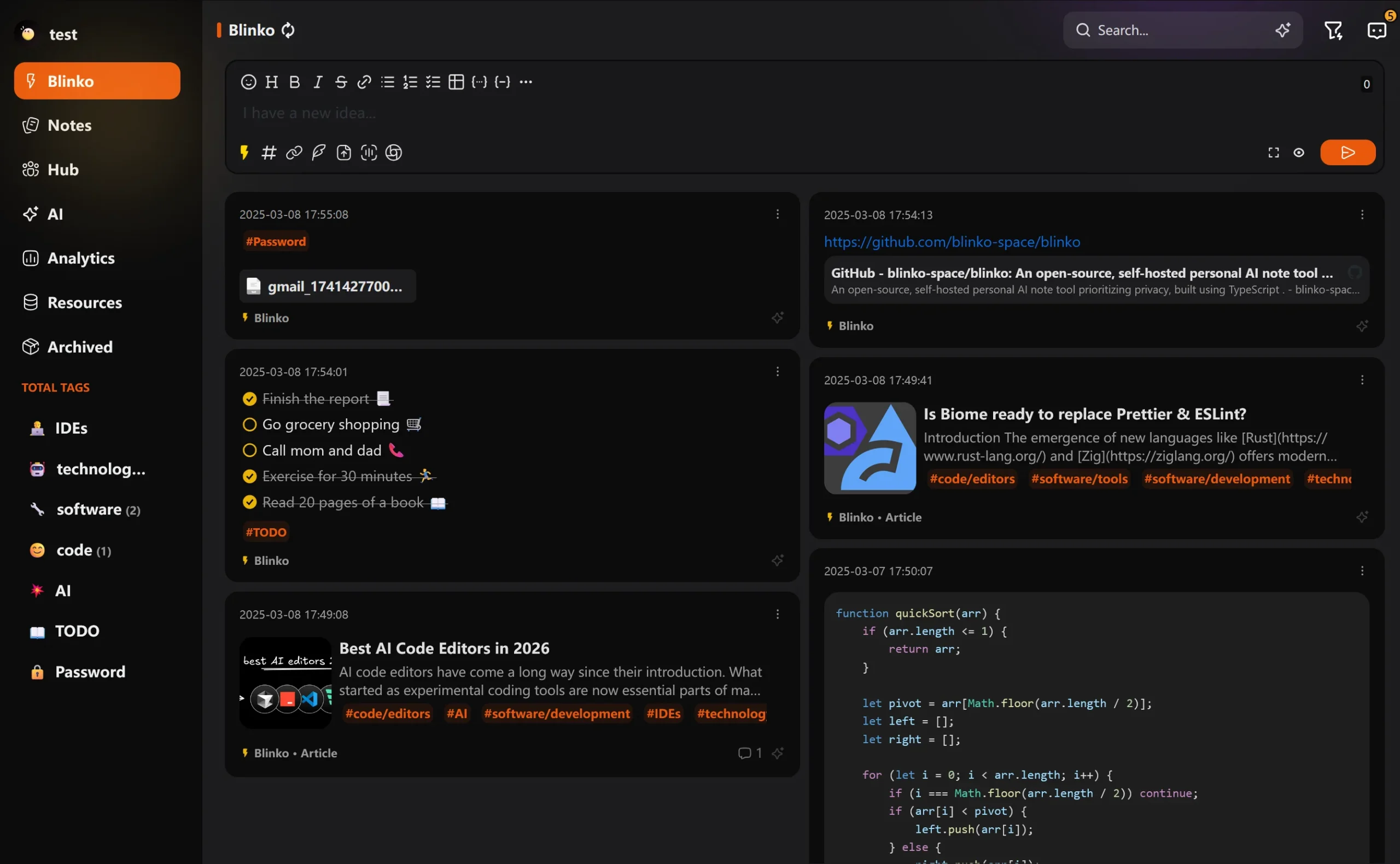
- Clean and Intuitive Interface: Blinko boasts a modern and uncluttered user interface. This focus on user experience makes it easy to jump in and start taking notes without a steep learning curve.
- Markdown Support: For those who appreciate the simplicity and power of Markdown, Blinko offers full support, allowing you to format your notes with ease.
- Tagging and Organization: Keep your thoughts organized with a flexible tagging system. This allows you to quickly find and group related notes.
- Quick Capture: Blinko emphasizes the ability to quickly jot down ideas before they disappear.
- RSS Publishing: The current server exposes RSS and Atom feeds for published note content. This is different from promising a built-in reader that subscribes to arbitrary external feeds.
- Public Note Sharing (Optional): If you wish, you can choose to share specific notes publicly, creating a simple way to disseminate information.
- Data Portability: Your notes are your own. Blinko allows for easy import and export of your data, helping you move your notes. Test that an export preserves the formats, attachments and relationships you rely on.
- Active Development: Blinko is a relatively new project, but it benefits from active development, with regular updates and a growing community.
Blinko vs. The Titans: What Makes it Different from Joplin and Trilium Next?
While Joplin and Trilium are formidable opponents in the self-hosted note-taking ring, Blinko brings its own unique flavor to the fight, especially for those prioritizing ease of use and a modern aesthetic in their homelab:
- Focus on Simplicity and User Experience: Where Trilium can sometimes feel like a complex, albeit powerful, personal wiki, and Joplin can appear a bit more utilitarian, Blinko aims for a more streamlined and visually appealing experience. This can be a significant advantage for non-technical users or those who simply prefer a cleaner interface.
- Natively AI-Ready (Self-Hosted): While you can integrate AI with Joplin and Trilium through various means, Blinko has made self-hosted AI a core (and increasingly user-friendly) feature. The ability to easily connect to your local AI models sets it apart.
- Modern Technology Stack: Built on newer technologies, Blinko often feels snappier and more in line with modern web application design.
- Lower Barrier to Entry for Self-Hosting (Arguably): While setting up any self-hosted application requires some technical know-how, Blinko's focus on Docker and clear documentation can make the initial setup feel less daunting for newcomers compared to some of the more complex configurations possible with Trilium or Joplin Server.
It's important to note that this isn't to say Blinko is better than Joplin or Trilium; it's different. Joplin's strengths lie in its mature ecosystem, extensive plugin support, and robust synchronization capabilities across various platforms. Trilium excels as a deep, interconnected knowledge base, ideal for building complex personal wikis and exploring relationships between notes. Blinko, on the other hand, carves its niche as a user-friendly, visually appealing, and AI-forward option for those who want a modern and straightforward self-hosted note-taking experience.
Navigating the Waters: Considerations and Downsides of Blinko
No application is perfect, and it's essential to be aware of potential downsides before diving in, especially with a self-hosted solution. Here are a few things to keep in mind with Blinko:
- Relative Youth: Compared to the long-standing Joplin and the feature-rich Trilium, Blinko is a younger project. This means its feature set might not be as extensive, and you might encounter occasional bugs or areas that are still under development.
- Smaller Community (For Now): While growing, Blinko's community is currently smaller than those surrounding Joplin and Trilium. This can mean fewer community-developed plugins and resources.
- Self-Hosting Responsibility: As with any self-hosted application, you are responsible for its setup, maintenance, and security. While Blinko aims to make this as easy as possible, it still requires a degree of technical comfort.
- AI Setup Can Still Be a Hurdle: While Blinko integrates with self-hosted AI, setting up and managing those AI models themselves can be a separate technical challenge.
The Verdict: Is Blinko Your Homelab's Next Note-Taking Hero?
For the homelab enthusiast seeking a self-hosted note-taking solution that is open-source, user-friendly, and embraces the potential of self-hosted AI, Blinko presents a very compelling case. It strikes a balance between simplicity and power, offering a modern and enjoyable way to capture, organize, and interact with your digital thoughts.
While it may not (yet) have the sprawling feature set of some of its more established counterparts, its focus on core functionality, ease of use, and future-forward AI integration makes it an exciting prospect. If you've been on the hunt for a note-taking app that respects your privacy, empowers you with control, and doesn't require a degree in computer science to set up and enjoy, then Blinko is certainly worth exploring. Give it a spin in your homelab – you might just find it's the perfect digital brain you've been searching for.
Deploy a Recoverable Blinko Instance
Use the project repository and the files matching the release you intend to run. Its example files include development and custom-server configurations; a filename containing “prod” does not mean that placeholder secrets, a private database address and commented persistence settings suit your server.
Blinko uses a PostgreSQL connection plus persistent application data. Provide the correct database service address, a strong database password, a random application authentication secret and appropriate external URLs. A phone's localhost is the phone, so it is not a suitable public application address for clients connecting to your homelab. Avoid publishing the database port beyond the application network unless another documented requirement needs it.
Keep database data and the application's persistent directory backed up together with configuration and required secrets. Changing a PostgreSQL image's major-version tag is not a complete database upgrade procedure. Pin a reviewed application release, check migrations and take a recovery point before updates. Restoring notes without their attachments is not a complete recovery.
Start with a private instance and a few disposable notes. Confirm account access, attachment upload and export/import before adding personal material. After a restart, check that both notes and files remain. Review signup and public-sharing controls in the installed version rather than relying on settings copied from a different screenshot.
Local AI and Retrieval You Can Verify
Blinko's retrieval-augmented generation uses relevant stored material to support an AI response. Embeddings represent text for similarity search; a chat model produces the answer. These roles can use different providers and models, and neither is a replacement for the original note.
To keep those operations local, configure supported local endpoints for both roles, such as a suitable Ollama deployment. The current provider source distinguishes the native Ollama provider from a generic OpenAI-compatible API. Use the URL format expected by that selected provider and verify access from the Blinko container, not only from your desktop browser.
Choose an embedding model and a chat model appropriate for the available hardware. Do not expose an unauthenticated model service to the public internet merely to solve a connection problem. If you change the embedding model or its output dimensions, use the application's documented index rebuilding controls; vectors from different models are not interchangeable simply because they contain the same number of values.
Test retrieval with a small note that contains a known fact, then ask both a directly matching question and one that the notes cannot answer. Check the supporting note rather than trusting a fluent response. Retrieval can miss material, and the model can still invent an answer; keep source notes accessible and use ordinary search when exact wording matters.
Local models consume memory, CPU/GPU time and storage, and model downloads initially require an external source. Cloud providers may receive prompts or note excerpts and may charge for requests. Review the actual endpoints, keys and data-sharing settings before indexing private material; a self-hosted web application does not imply an entirely offline AI pipeline.
Decide Through Your Everyday Workflow
The appeal of Blinko remains quick capture with an approachable interface and optional AI assistance. Joplin and TriliumNext still have different strengths for notebooks, synchronization and connected knowledge bases. Compare the work you actually do rather than treating technology-stack age as a speed benchmark.
Try capturing a short idea on your phone, expanding it later, finding it by tag and exporting it with an attachment. Check which clients and releases support your required features. Native-app availability is separate from how much work can be done offline and how conflicts are handled after reconnecting. A successful small trial and a tested restore are more useful than assuming a clean interface guarantees dependable storage.