Few product prefixes in consumer networking carry as much history as D-Link's DIR series. The DIR name spans several Wi-Fi generations, including older 802.11n DIR-825 revisions, AC1200 variants and the Wi-Fi 6 DIR-X models discussed here.
While modular whole-home mesh systems like the D-Link Eagle Pro AI dominate marketing headlines today, a centrally positioned standalone router can be a practical choice for single-story homes, open-plan apartments, and gaming workstations. Latency depends on the connection path, signal quality and load; a mesh system using Ethernet backhaul does not add a wireless backhaul hop. In this guide, we examine the architecture, key generations, Wi-Fi 6 upgrades, and practical deployment scenarios across the D-Link DIR router family.
The Evolution of the D-Link DIR Series
To understand where the DIR series stands today, it helps to understand its technological trajectory. In the late 2000s, iconic units like the DIR-655 introduced gigabit Ethernet ports, intelligent QoS packet scheduling, and USB SharePort storage to mainstream home users. As the industry migrated from Wi-Fi 4 (802.11n) to Wi-Fi 5 (802.11ac), D-Link expanded the line into dual-band workhorses and flamboyant high-performance designs (including the distinctive red pyramidal DIR-890L AC3200 tri-band router).
With the arrival of Wi-Fi 6 (802.11ax), D-Link overhauled the lineup under the DIR-X moniker. These modern routers retain the traditional 4-port gigabit LAN desktop form factor while integrating modern orthogonal frequency-division multiple access (OFDMA), 1024-QAM modulation, and target wake time (TWT) power savings, bringing enterprise-grade airtime efficiency to home environments.
Classic AC Workhorses: DIR-842 and DIR-825
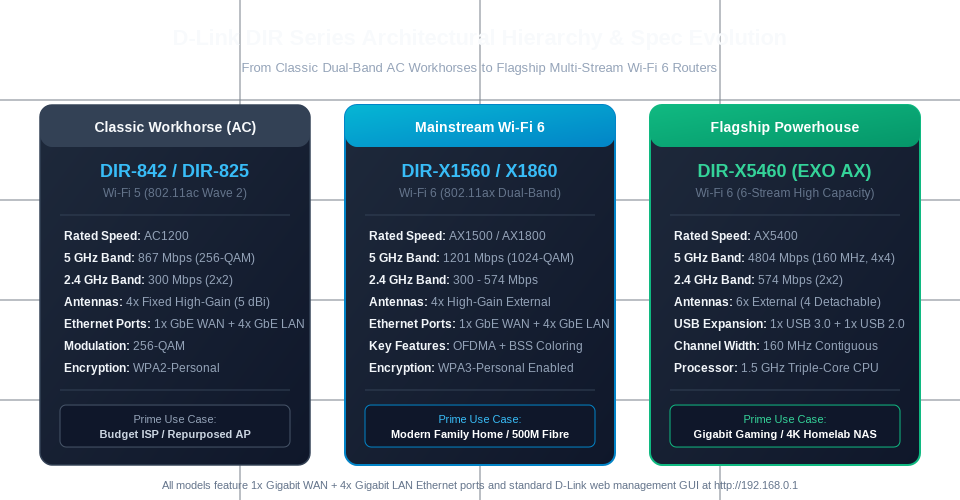
Before exploring Wi-Fi 6 models, it is worth acknowledging the familiar workhorses: the DIR-842 and DIR-825. The specifications below concern AC1200 variants. The same model names also cover different hardware: an older DIR-825 Rev C is an 802.11n router with two detachable antennas. Match the revision and region before comparing ports, antennas or firmware:
- Wireless Architecture: Delivers up to 867 Mbps on the 5 GHz band (802.11ac) and up to 300 Mbps on the 2.4 GHz band (802.11n).
- External Antenna Array: Antenna construction varies by revision and region. The US DIR-842 Rev C datasheet specifies four detachable antennas; check your exact DIR-842 or DIR-825 label before applying another revision's specifications.
- Wired Connectivity: The US DIR-842 Rev C datasheet and checked India DIR-825 J1 page list one Gigabit WAN port and four Gigabit LAN ports. These are port link rates; file-transfer speed also depends on the clients, storage and traffic.
- ISP Firmware Customization: ISP-supplied and retail firmware can differ. Check the manual for your regional hardware revision and any ISP restrictions before relying on VLAN, IPv6 or remote provisioning controls.
Modern Wi-Fi 6 Lineup: The DIR-X Generation
For users upgrading their home broadband to 300 Mbps, 500 Mbps, or full gigabit fibre, the DIR-X models discussed here offer substantial performance leaps over older AC hardware. The models below illustrate distinct performance tiers. Check current regional support before buying: the UK page marks the DIR-X5460 as phased out, and US support for DIR-X1560 ended in July 2025.
1. DIR-X1560 (AX1500)
The DIR-X1560 serves as D-Link’s entry point into Wi-Fi 6. It pairs a 1201 Mbps 5 GHz radio (operating with 1024-QAM modulation) with a 300 Mbps 2.4 GHz radio. Powered by a triple-core 1.5 GHz SoC, its processor provides resources for routing and management, but CPU specifications alone do not guarantee performance with many connections or 4K streams.
2. DIR-X1860 (AX1800)
The DIR-X1860 upgrades the 2.4 GHz band to true Wi-Fi 6 (802.11ax), delivering up to 574 Mbps on 2.4 GHz alongside the 1201 Mbps 5 GHz stream. Compatible Wi-Fi 6 clients can use the newer features on both bands. Legacy IoT clients do not gain Wi-Fi 6 OFDMA or TWT merely by connecting to the router.
3. DIR-X5460 (AX5400 EXO AX)
Sitting at the high end of the family, the DIR-X5460 is engineered for bandwidth-heavy households and gamers. Key technical specifications include:
- 6-Stream Dual-Band Radio: Delivers up to 4804 Mbps on 5 GHz (4x4 spatial streams) and 574 Mbps on 2.4 GHz (2x2 streams).
- 160 MHz Contiguous Channel Support: Enables compatible Wi-Fi 6 client cards (such as Intel AX200/AX210 laptops) to negotiate full 2.4 Gbps physical link rates over the air.
- 6 External Antennas with Power Amplifiers: D-Link's checked UK specification lists six fixed omnidirectional antennas. Antenna count does not establish wall-penetration performance in a particular home.
- Dual USB Expansion: Includes one USB 3.0 port and one USB 2.0 port for local Samba file sharing and DLNA media streaming across your home network.
Hardware Specs & Comparison Breakdown
To help you select the ideal model for your specific floorplan and broadband tier, here is how the primary DIR generations compare side by side:
| Feature / Spec | DIR-842 Rev C (US) | DIR-X1560 (Entry AX) | DIR-X1860 (Mainstream AX) | DIR-X5460 (Flagship AX) |
|---|---|---|---|---|
| Wireless Generation | Wi-Fi 5 (802.11ac) | Wi-Fi 6 (802.11ax) | Wi-Fi 6 (802.11ax) | Wi-Fi 6 (802.11ax) |
| Speed Rating | AC1200 (867 + 300) | AX1500 (1201 + 300) | AX1800 (1201 + 574) | AX5400 (4804 + 574) |
| Channel Width | Up to 80 MHz | Up to 80 MHz | Up to 80 MHz | Up to 160 MHz contiguous |
| Spatial Streams | 2x2 (5GHz) + 2x2 (2.4GHz) | 2x2 (5GHz) + 2x2 (2.4GHz) | 2x2 (5GHz) + 2x2 (2.4GHz) | 4x4 (5GHz) + 2x2 (2.4GHz) |
| Modulation | 256-QAM | 1024-QAM | 1024-QAM | 1024-QAM |
| OFDMA / MU-MIMO | DL MU-MIMO only | OFDMA + MU-MIMO | OFDMA + MU-MIMO | OFDMA + 4x4 MU-MIMO |
| Antenna Count | 4x External; fixed/detachable varies by revision | 4x External Fixed | 4x External Fixed | 6x External Fixed |
| Gigabit Ports | 1x WAN + 4x LAN | 1x WAN + 4x LAN | 1x WAN + 4x LAN | 1x WAN + 4x LAN |
| USB Ports | None | None | None | 1x USB 3.0 + 1x USB 2.0 |
| Security Standard | WPA2-Personal | WPA3-Personal | WPA3-Personal | WPA3-Personal |
Standalone High-Gain Router vs. Mesh Wi-Fi
With multi-node mesh packages like the D-Link M15 and TP-Link Deco widely available, when should you choose a standalone DIR router instead? Consider these critical architectural differences:
- Port Density: Compact mesh nodes usually offer only 1 or 2 Ethernet jacks per cube. If your entertainment center or homelab desk houses a desktop PC, gaming console, network-attached storage (NAS), and smart TV, a standalone DIR router provides 4 dedicated Gigabit LAN ports right out of the box without requiring an external desktop switch.
- Lower RF Latency for Gaming: Wireless mesh systems introduce hop-by-hop latency and airtime contention across wireless backhaul channels. A high-gain standalone router like the DIR-X5460 maintains a single direct RF link to client radios, eliminating backhaul queuing delays.
- Cost Efficiency in Compact Layouts: For a compact layout, try a centrally positioned router before adding nodes. Compare current local prices and test the rooms you need to cover; floor area alone does not establish coverage, signal superiority or a fixed price advantage.
- Detailed Web GUI Management: The checked DIR models provide local web management. Use the address in the matching manual, commonly
http://192.168.0.1, and confirm the routing, DNS and firewall controls available in your revision and firmware.
Setup, Security Hardening & Repurposing
Hardening Your DIR Router
Whether deploying a brand-new DIR-X router or maintaining an older DIR-842, follow these foundational security hardening practices:
- Change Default Credentials: Immediately replace the default admin password upon initial setup. Never expose the web administration GUI to the public Internet; disable remote administration using the control documented for your exact revision and firmware.
- Enable WPA3 Encryption: Under wireless security settings, transition from legacy WPA2-Personal to WPA3-Personal (or WPA2/WPA3 Transitional Mode) where both router and clients support it. WPA3-Personal uses SAE to improve resistance to offline password guessing. Keep firmware patched too; changing the security mode is not a substitute for fixes to key-reinstallation vulnerabilities.
- Disable WPS (Wi-Fi Protected Setup): While convenient for pairing printers, legacy WPS PIN brute-forcing vulnerabilities make keeping WPS permanently disabled a best-practice security measure.
- Manage UPnP Deliberately: Universal Plug and Play automatically maps inbound ports for game consoles, but can be abused by rogue IoT malware. If you run a homelab, disable UPnP and configure explicit, audited port-forwarding rules instead.
Repurposing Older DIR Routers as Access Points
Before repurposing a DIR-842 or DIR-825, check its exact hardware revision, region and support status. D-Link recommends retiring the end-of-support models covered by its advisories. Access-point mode does not repair unsupported firmware. The following LAN-to-LAN arrangement applies only to hardware you have established is suitable to keep in service:
- Connect a computer directly to one of the LAN ports of the old DIR router (leave the WAN port disconnected).
- Use the management address documented for your model, or its configured address; a common default is
http://192.168.0.1. - Find the LAN/DHCP settings for your firmware and disable the internal DHCP server.
- Change the router’s LAN IP address to an unused IP address on your primary subnet (for example,
192.168.1.250if your main router is192.168.1.1). - Save settings and reboot the router. Connect an Ethernet cable from your main network switch into one of the LAN ports (not the WAN port) on the old DIR router.
With DHCP disabled and LAN addressing configured correctly, this LAN-to-LAN arrangement can provide switching and Wi-Fi access without a second routing/NAT layer. Port speeds and supported operating modes depend on the exact revision.
Verdict: Which DIR Router Should You Choose?
The D-Link DIR series continues to prove that standalone desktop routers remain indispensable in modern home networking. For modest broadband connections or budget-conscious setups, the DIR-X1560 and DIR-X1860 deliver modern Wi-Fi 6 airtime efficiency, robust 4-port Gigabit switching, and WPA3 security at highly accessible price points.
For demanding households with gigabit fibre, multiple simultaneous 4K streams, and local NAS storage, the DIR-X5460 provides the 160 MHz channel bandwidth and 6-stream multi-gigabit throughput needed to saturate modern wireless cards. Explore our companion breakdowns of the D-Link Eagle Pro AI mesh ecosystem and our complete guide to Understanding Home Routers to determine the best layout for your network.