In our quest to create the perfect homelab, while also saving money and taking control of our data, there are quite a few services that we need to host on our own hardware before we can really say that we are self-hosting homelabbers. Today, we're diving deep into Monica CRM – a unique take on customer relationship management, reimagined for personal connections.
First Off, What Exactly is a CRM?
CRM stands for Customer Relationship Management. Traditionally, businesses use CRM software to manage and analyze customer interactions and data throughout the customer lifecycle. The goal is simple: improve business relationships, assist in customer retention, and drive sales growth. CRMs store customer contact information, track sales leads, log service issues, manage marketing campaigns, and provide valuable insights by organizing and making accessible vast amounts of customer data. Think of it as a centralized hub for all things customer-related.
How Does a CRM Fit into a Homelab?
Now, you might be wondering, "Why would I need a CRM in my homelab?" This is where Monica shines with its unique proposition. While traditional CRMs focus on business customers, Monica is designed as a Personal Relationship Manager.
Imagine having a dedicated space to:
- Remember important details about your friends, family, and colleagues: Birthdays, anniversaries, kids' names, gift ideas, or even how you met someone.
- Keep track of interactions: Log calls, emails, meetings, and significant conversations.
- Set reminders: Get prompted to reach out to people you haven't connected with in a while or for important dates.
- Organize your personal network: Understand the relationships between your contacts.
- Manage activities and tasks related to your personal life.
For the homelab enthusiast, self-hosting Monica means you have complete control over this sensitive personal data. You choose the server, access rules and backup destinations. Third-party email delivery, avatar services or other enabled integrations can still receive information, so check their settings before entering sensitive details. Technology can support your relationships, much like we use it to organize a home network or media library.
Introducing Monica: Your Personal Relationship Manager
Monica CRM is an open-source web application designed to help you organize and record your interactions with your loved ones and personal contacts. It's often described as a "CRM for your personal life." The core idea is to provide a tool that helps you be a better friend, family member, or partner by helping you remember the little things that matter.
How it Works:
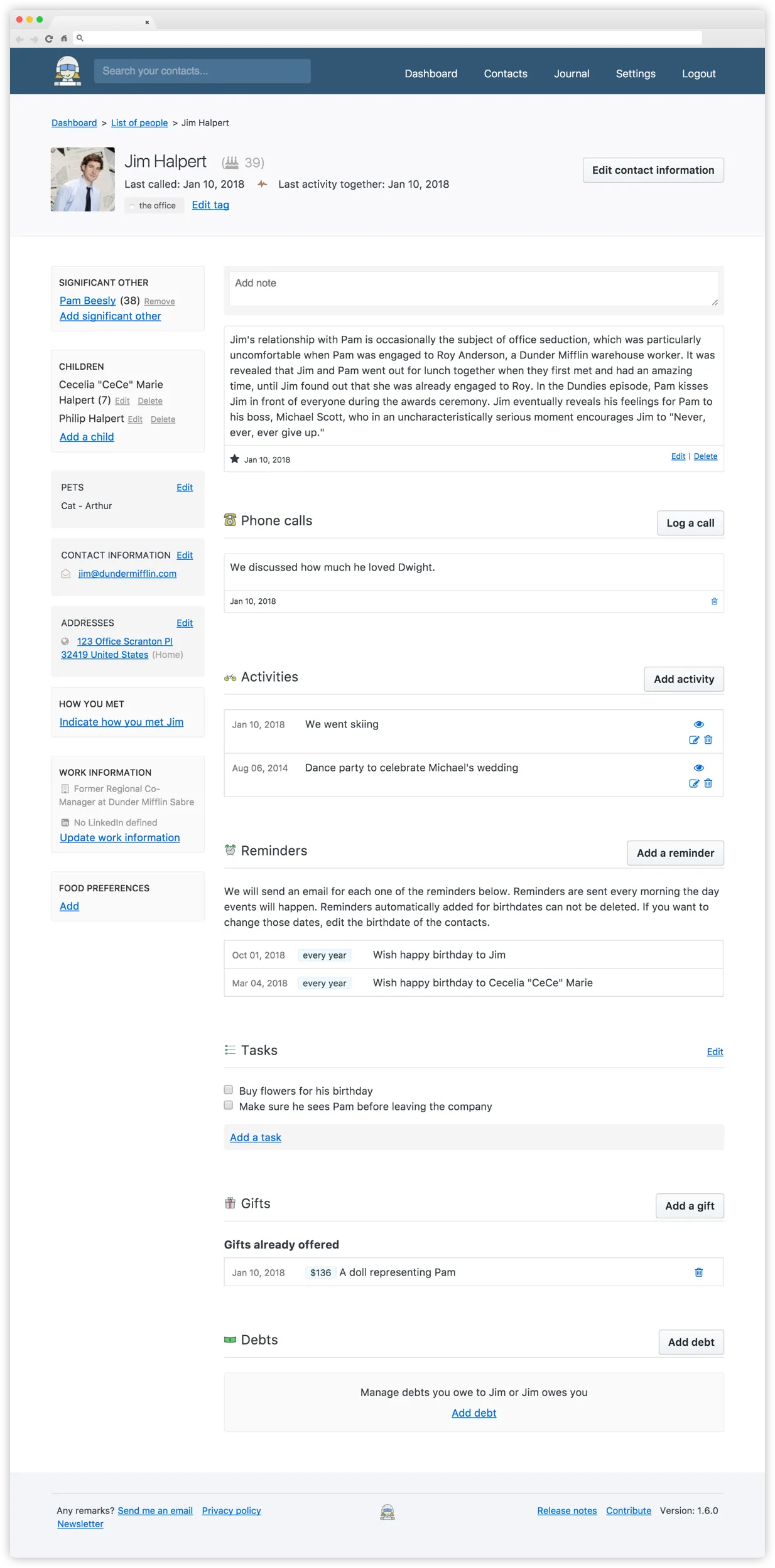
Monica allows you to create detailed profiles for your contacts. For each contact, you can log:
- Basic Information: Names, contact details, photos.
- Relationships: Define how people are connected to each other (e.g., family, colleagues).
- Reminders: Set up one-time or recurring reminders for birthdays, anniversaries, or just to get in touch.
- Activities: Log activities you've done with contacts, like a dinner or a phone call.
- Conversations: Keep notes on important discussions.
- Debts: Track money owed or borrowed.
- Journal: Keep a personal journal to record your own life events and thoughts.
- Documents & Photos: Upload relevant files.
The interface is designed to be simple and intuitive, focusing on ease of use rather than overwhelming users with complex business-centric features.
The Tech Behind Monica
For those interested in what makes Monica tick, its technology stack primarily includes:
- PHP (Laravel Framework): The backend is built using PHP with the popular Laravel framework, known for its elegance and developer-friendliness.
- MySQL/MariaDB: Monica uses a MySQL or MariaDB database to store all your information.
- HTTP Server: You'll need a web server like Apache or Nginx to serve the application.
- Composer: For managing PHP dependencies.
- Redis (Optional): Available for configured caching or asynchronous queues. Classic Monica defaults to synchronous queue processing; choosing a non-synchronous queue requires a matching worker.
This is a fairly standard and well-supported stack, making it relatively straightforward to set up and maintain for homelabbers familiar with web applications.
Deep Dive into Monica's Features
Monica comes packed with features tailored for personal relationship management:
- Contact Management: Add and manage detailed information about your contacts, including custom fields.
- Relationship Mapping: Define and visualize relationships between contacts.
- Automated Reminders: Get automatic reminders for birthdays and other important dates you set.
- Activity Tracking: Log various activities you share with your contacts.
- Notes & Conversations: Keep detailed notes and log conversations, so you never forget important details.
- Task Management: Create tasks related to your contacts or personal life.
- Journaling: A dedicated space to write about your day and personal reflections.
- Gift Management: Keep track of gift ideas, purchases, and received gifts.
- Debt Tracking: A simple way to manage personal debts.
- Data Import/Export: Easily import your existing contacts and export your data.
- API Access: For a more technical approach, Monica provides an API to interact with your data programmatically.
- Multi-user Support: Useful if you want to invite a partner or family member into a shared account. Contacts within that account are shared; an invitation is not a promise of a separate private vault for each user.
- Tags & Favorites: Organize your contacts with tags and mark favorites for quick access.
- Customization: Define custom activity types, contact field types, and even genders.
- Multilingual: Available in numerous languages.
Self-Hosting: The Homelabber's Choice
While MonicaHQ offers a hosted version for a monthly fee (around USD 9 per month or USD 90 per year), the true appeal for us homelab enthusiasts is the ability to self-host it without a Monica software subscription. This gives you:
- Complete Data Sovereignty: You choose where the application stores data and where its backups go.
- No Subscription Fees: Run the software without a hosted-service subscription; hardware, electricity, domain and email costs still belong in the budget.
- Full Feature Access: The open-source application provides the personal CRM features. Hosted subscriptions also pay for managed backups, updates, email delivery, infrastructure monitoring and support; self-hosting makes these your responsibility.
- Customization Potential: Being open-source, you can even delve into the code if you wish.
Getting Monica Up and Running in Your Homelab
Choose the documentation and image for the Monica version you intend to run. The project distinguishes its stable classic 4.x branch from development work on the newer application; cloning the repository's default branch is not a safe shortcut to a stable installation.
- Manual installation: Classic Monica uses Laravel, PHP and MySQL/MariaDB. Its
4.xdependency file specifies PHP^8.1, but this does not guarantee compatibility with every later PHP release. Check the release's extension and dependency requirements, install Composer dependencies and follow its deployment instructions. - Docker or Docker Compose: Use the publisher's Docker repository, choosing the complete example that fits your deployment. The Apache image includes a web server; an FPM image needs a separately configured server. Pin the application release and a compatible database version rather than silently following rolling tags.
- Managed application platforms: A platform or community app catalogue can simplify provisioning, but verify its package version, maintenance and persistent storage first. A one-click installation still needs working email, backups and an update plan.
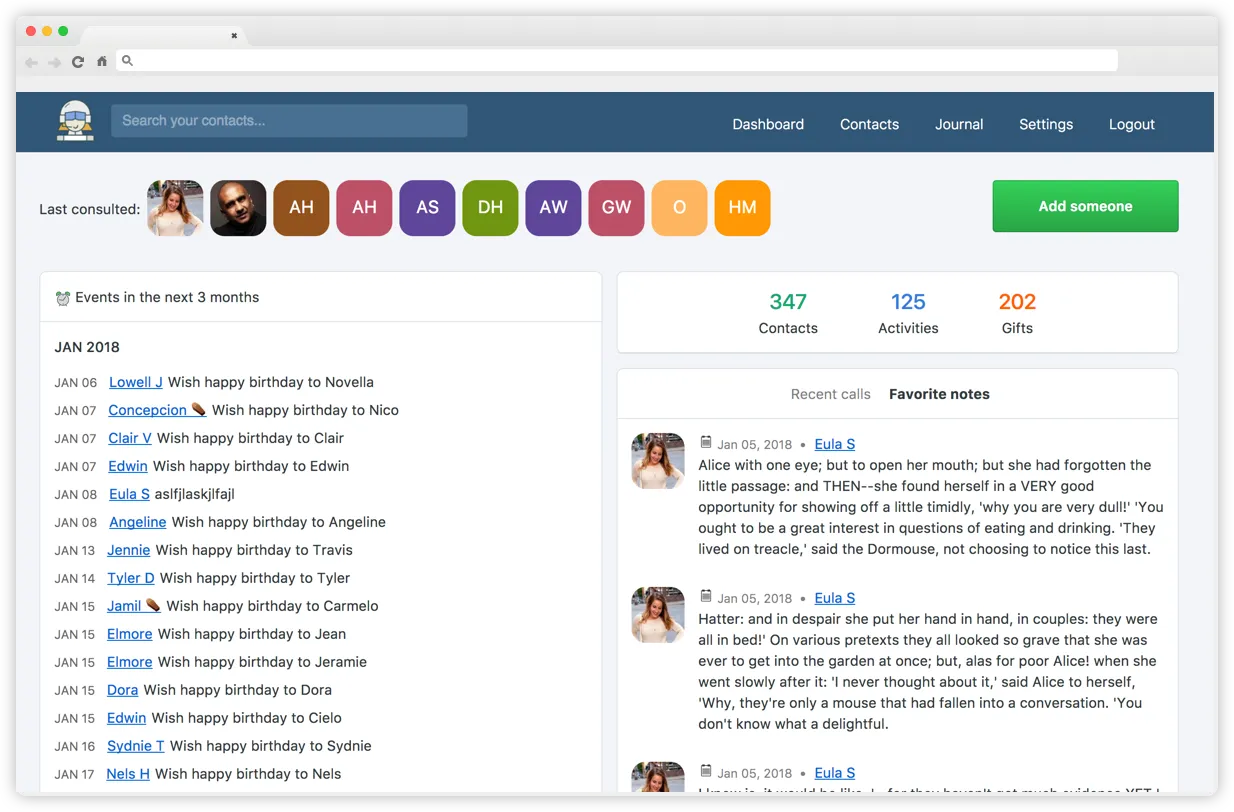
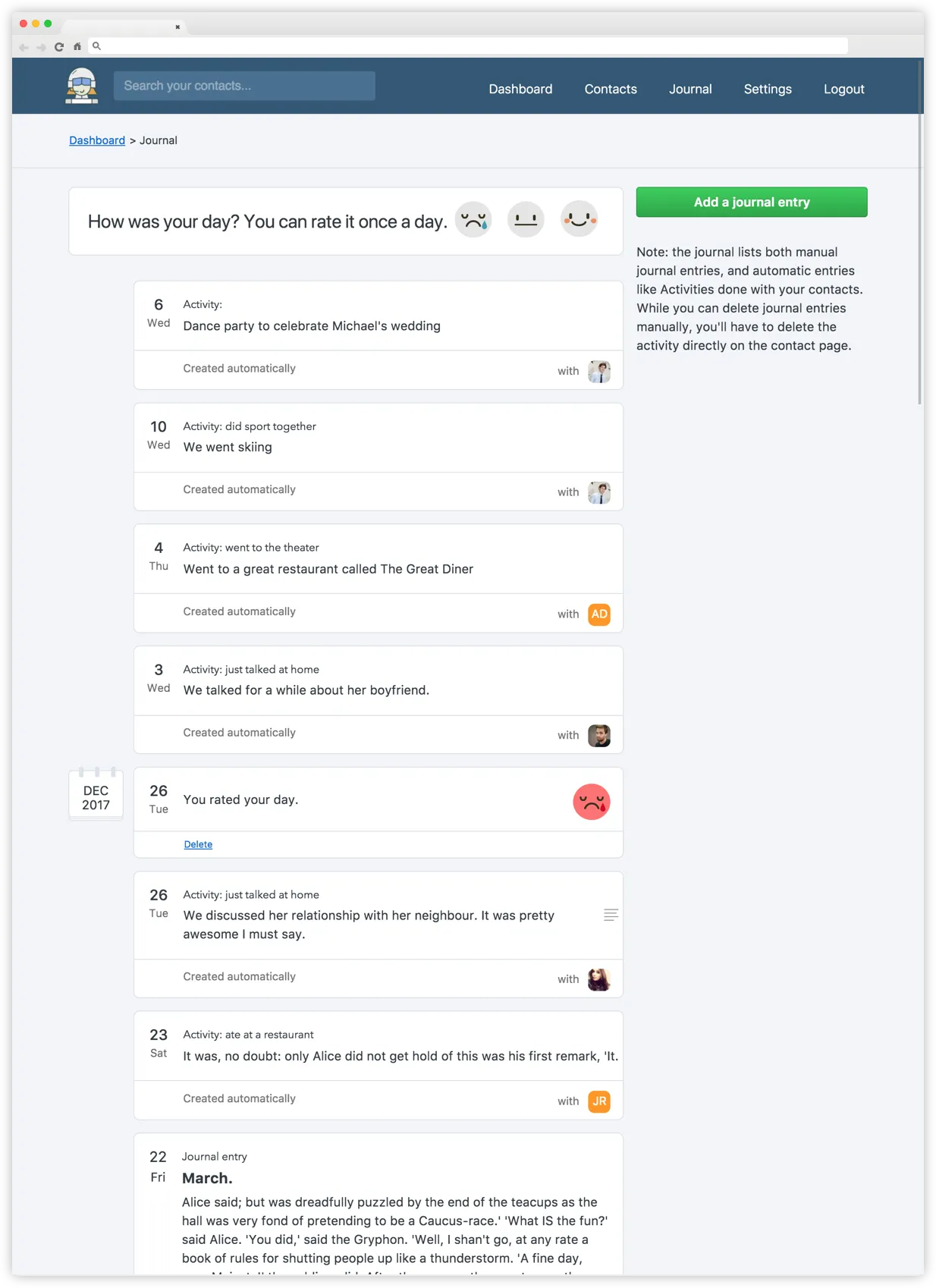
The feature screenshot shows Monica version 1.6.0, and the dashboard and journal examples contain 2017–2018 demonstration dates. They illustrate the personal CRM workflow; menu names and appearance can differ in the version you deploy.
Alternatives to Monica for Self-Hosting
While Monica is quite unique in its focus on personal relationships, if you're looking for other open-source, self-hostable CRM-like tools, you might consider:
- SuiteCRM: A very popular, full-featured open-source CRM that is more aligned with traditional business CRM functionalities. It's robust and highly customizable.
- EspoCRM: Another open-source business CRM option for sales, customer service and marketing. Compare its workflow and resource use on your own deployment.
- Twenty: A newer entrant positioning itself as a flexible, open-source CRM designed with simplicity in mind, also offering self-hosting. While it can be used for business, its clean interface might appeal to some for personal contact management with a bit of tweaking.
- Vtiger CRM Open Source: A comprehensive CRM solution offering sales, support, and marketing automation.
It's important to note that most alternatives are geared towards business use cases, making Monica stand out for its personal focus.
Conclusion: Strengthen Your Connections with Self-Hosted Monica
Monica CRM offers a refreshing and valuable tool for anyone looking to be more intentional about their personal relationships. By bringing the organizational power of a CRM into the personal sphere, it helps you remember the details that foster deeper connections.
For the self-hosting enthusiast, Monica is a perfect fit. It's open-source, allows for complete data ownership, and runs beautifully in a homelab environment using tools like Docker. With its rich feature set, from reminders and activity logging to journaling and relationship mapping, Monica empowers you to manage your personal network effectively.
So, if you're ready to take control of your personal relationship data and give your social life a well-organized, private digital assistant, firing up an instance of Monica in your homelab is a project well worth undertaking.
Visit the official Monica website
Reliable Docker Deployment and Reminders
Monica needs more than a working login page. Keep the database and application storage persistent, configure the public APP_URL, and give every application, scheduler and queue process the same application key, database details, email settings and required storage access. The publisher's full and supervisor examples show different ways to run background processing; download the complete example directory because additional Dockerfiles, web-server configuration or secret definitions may be required.
For a new installation, generate the key once on a trusted machine:
echo "base64:$(openssl rand -base64 32)"Store that value securely as APP_KEY. Do not regenerate it during an update or restart: retain it with your backups so encrypted application data remains usable. The publisher's classic Docker instructions include initial database preparation and setup:production; follow the instructions for your selected release before relying on the service.
Keep first setup behind a private network or access restriction until you create the owner account. In classic Monica, APP_DISABLE_SIGNUP=true still permits the first account when no account exists, then blocks ordinary public registration. Confirm this behavior after bootstrap instead of assuming that setting alone protects an unclaimed fresh instance.
Configure SMTP and the scheduler before trusting birthday reminders. The publisher's dedicated scheduler service uses command: cron.sh, preserving the image entrypoint. A queue worker is a separate concern: asynchronous queue drivers need one, while the default synchronous driver does not need a Redis queue merely to display contacts. If reminders fail, check the application's timezone, recipient address, scheduler execution, queue backlog where applicable, and email delivery logs.
Test with one harmless sample contact and a near-term reminder. Confirm the reminder appears in Monica and reaches the intended mailbox; check spam filtering and delivery errors. A running container and a successful web login do not prove scheduled email works. Protect SMTP credentials and avoid printing application keys or passwords in shared logs.
Built-In CardDAV and CalDAV Synchronization
Classic Monica exposes DAV when DAV_ENABLED is enabled. Use the URL shown under Settings → DAV Resources, particularly if the application sits behind a reverse proxy or under a subpath. Authentication uses your email address as the username and a generated API token as the password, rather than the normal account password.
CardDAV connects supported contact fields to a compatible address-book client. The classic backend accepts contact updates and deletions, so phone-side changes can affect the server. Start with a separate address book and one test contact; verify names, numbers, addresses and deletion behavior before linking your main contacts. Android needs a DAV-capable synchronization client such as DAVx⁵. Client support and field mapping determine what appears in the native contacts application.
CalDAV provides contact birthdays and tasks; it is not a promise that every journal entry, private note, activity or reminder becomes a phone calendar event. Select the available collections in your client, verify timezone and recurrence behavior, and revoke an API token when you stop using the device.
Private Data and Recovery
A relationship manager holds information about other people as well as you. Record only details you need, keep especially sensitive notes out unless you have a clear reason, and review who can access a shared account. Restrict administrative access, use HTTPS for remote connections and maintain the application and host.
Back up the database, uploaded files or configured object storage, application configuration and original encryption key together. Contact exports are useful for portability but cannot replace a complete backup of notes, journal entries, gifts and application state. Practice restoring into an isolated instance, then verify a sample contact, attachment and reminder without sending duplicate notifications. Keep backup access restricted and retain an independent copy outside the server's failure domain.