
These days, external services (whether paid or free) handle way too much of our online lives. If you’re tired of that and want more control over your personal info and you don’t mind getting your hands dirty with some tech projects, setting up your own homelab system could be a fun move. Follow our build your own homelab series if you want a step-by-step guide of building, setting up and managing a homelab for your own self-hosting features. One kind of service many of us use, and can host ourselves, is Radicale. It’s a no-fuss way to host your own calendars and contact lists at home, giving you a real alternative to relying on corporate apps. Think of it like running your own private version of Google Calendar or iCloud, but without the big-company baggage. Let's take a look at what Radicale is, how it works, and why you might want to consider running it in your very own homelab.
What is Radicale?
At its core, Radicale (pronounced rad-i-kahl) is a free and open-source server that allows you to store and synchronize your calendars and contacts across all your devices. Think of it as your personal, private alternative to services like Google Calendar, Apple Calendar, or your email provider's contact list. The key difference? With Radicale, you are in control of your data because it runs on your hardware.
How Does Radicale Work?
Radicale achieves its magic through two key internet standards:
- CalDAV (Calendaring Extensions to WebDAV): This protocol allows you to access and manage your calendars over the internet. When you create an event on your phone, your CalDAV client (the calendar app) sends this information to your Radicale server, which then makes it available to your other devices (like your laptop or tablet) that are also connected to Radicale.
- CardDAV (vCard Extensions to WebDAV): Similar to CalDAV, CardDAV is a protocol designed for managing your contacts. It enables you to store your address book on your Radicale server and keep it synchronized across all your devices.
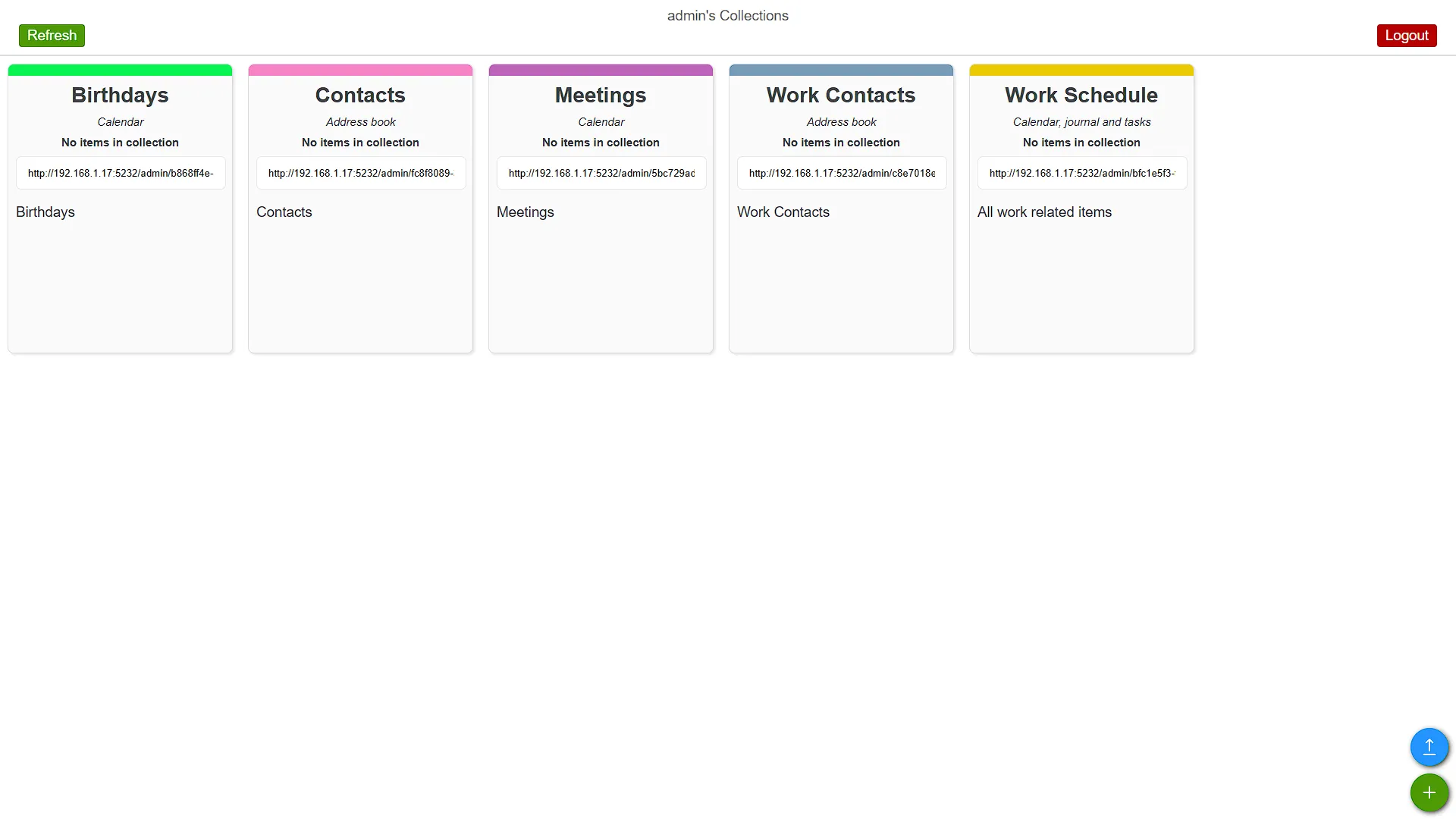
Radicale acts as the central hub for your CalDAV and CardDAV data. It doesn't come with a fancy web interface for managing your calendars and contacts directly (though it has a basic one for administration). Instead, it works seamlessly in the background with a wide variety of existing calendar and contact applications on your phone, computer, and other devices.
Why Self-Host Radicale in Your Homelab?
The benefits of running your own Radicale server are compelling, especially if you value privacy and control:
- Data Ownership and Privacy: This is arguably the most significant advantage. When you use cloud-based calendar and contact services, your data resides on someone else's servers, subject to their terms of service and potentially accessible for various purposes. With Radicale, you choose where data is stored and who can access it. Client caches, exports and off-site backups also need protection.
- No Vendor Lock-In: You're not tied to any specific company or ecosystem. You can switch calendar and contact apps on your devices without worrying about migrating your data, as long as they support CalDAV and CardDAV.
- Simplicity and Lightweight: Radicale is designed to be easy to set up and maintain. It has minimal dependencies and a small footprint, making it ideal for running on even modest homelab hardware like a Raspberry Pi.
- Offline Access and Synchronization: The server can remain reachable locally during an internet outage if local networking and name resolution still work. Offline access on a disconnected device depends on its client's cache; changes synchronize when it reaches the server again.
- Learning and Customization: Self-hosting Radicale provides an excellent opportunity to learn about server administration, networking, and open-source software. You can customize its configuration to suit your specific needs.
Radicale's Great Features
Radicale isn't just about privacy; it also boasts several features that make it a great choice for self-hosting:
- File-Based Storage: By default, Radicale stores your calendars and contacts as simple files on your server. This makes backups incredibly straightforward – copy a consistent collection-storage backup together with configuration and authentication/rights files. Avoid manually editing live storage, and restore a sample calendar before relying on the backup.
- Extensibility: Radicale supports plugins, allowing you to extend its functionality. This includes options for different authentication methods, storage backends, and more.
- Cross-Platform Compatibility: Radicale runs on Linux, macOS, and Windows, and there are Docker images available for easy containerized deployment.
- Wide Client Compatibility: It works with a vast array of CalDAV and CardDAV clients across all major operating systems, including popular choices like Thunderbird, Evolution, DAVx⁵ (Android), and the built-in calendar and contacts apps on iOS and macOS.
- Security: Radicale supports secure connections using SSL/TLS to encrypt your data in transit, and you can configure various authentication methods to protect access to your server.
Where Radicale Could Improve
While Radicale is an excellent tool, it's essential to be aware of its limitations:
- Basic Web Interface: As mentioned, Radicale's built-in web interface is minimal. It's primarily for creating new calendars and address books and doesn't offer a full-featured management experience. You'll rely on your client applications for most interactions.
- User Management: Depending on your setup, managing multiple users and their permissions might require some manual configuration or the use of plugins. It's not as "out-of-the-box" for multi-user environments as some other solutions.
- No Built-In Email/Groupware: Radicale focuses solely on calendars and contacts. If you're looking for an all-in-one solution with email, file sharing, and other groupware features, you'll need to look elsewhere or integrate Radicale with other services.
Radicale Alternatives
Radicale isn't the only player in the self-hosted CalDAV and CardDAV game. Here are a few alternatives and what sets them apart:
- Baikal: Baikal is another lightweight CalDAV and CardDAV server. Unlike Radicale's file-based storage, Baikal uses a database (like MySQL or SQLite) to store your data. It also features a more comprehensive web interface for managing users and resources, which some might find more user-friendly than Radicale's approach.
- Sabre/dav: Sabre/dav isn't a standalone server in the same way as Radicale or Baikal. Instead, it's a powerful framework written in PHP that provides the building blocks for creating your own WebDAV, CalDAV, and CardDAV servers. This offers a high degree of flexibility but requires more technical expertise to set up and manage.
- Nextcloud/ownCloud Calendar & Contacts: If you're looking for a more integrated and feature-rich self-hosted solution, Nextcloud and ownCloud are popular choices. These are complete "private cloud" suites that offer file sharing, collaboration tools, and, importantly, robust calendar and contact management features. While they provide a more all-in-one experience, they are also significantly more resource-intensive and complex to set up and maintain than Radicale.
A Quick Overview of Installation Options
Getting Radicale up and running can be surprisingly straightforward, depending on your technical comfort level and your homelab setup. We are not going into detail here to explain the actual installation, but keep an eye on our Build your own homelab series if you are interested in the step-by-step guide. Here are some common installation approaches:
- Package Managers: Many Linux distributions offer Radicale in their official repositories. This is often the easiest way to install it, as your system's package manager will handle dependencies.
- Pip (Python Package Installer): Since Radicale is written in Python, you can install it using
pipin a dedicated virtual environment. This gives you more control over the version and installation location. - Docker: Running Radicale in a Docker container is a popular option for homelabbers. It encapsulates Radicale and its dependencies, making it easy to deploy and manage, especially if you're already using Docker for other services.
- Manual Installation: For those who want maximum control, you can download the Radicale source code and install it manually.
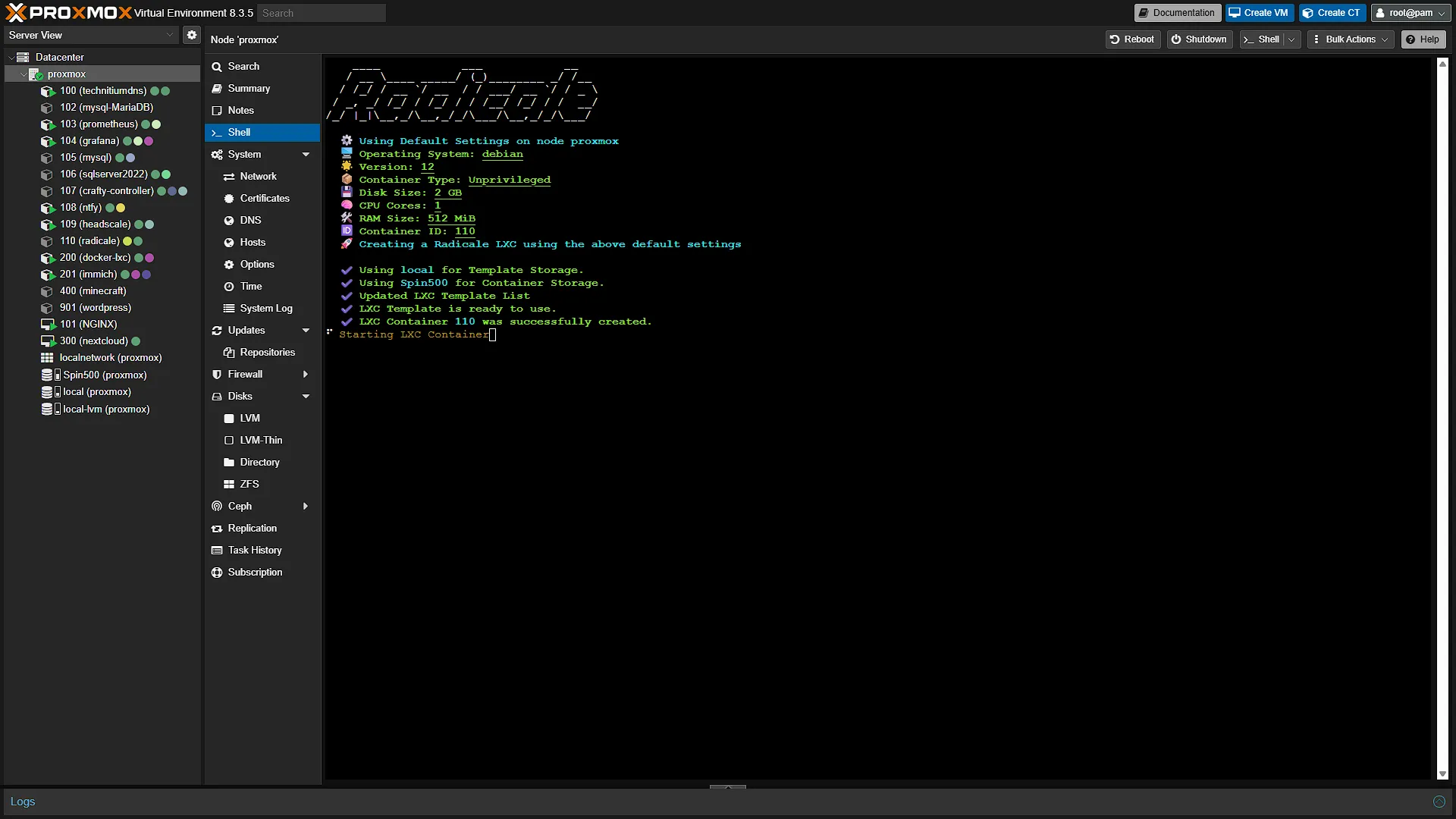
- Proxmox Helper Script: If you are running Proxmox for your homelab (like we are), there is a fantastic helper script at helper-scripts.com that you can follow: https://community-scripts.github.io/ProxmoxVE/scripts?id=radicale. This will be our recommended way of installing Radicale.
Regardless of the installation method, you'll need to configure Radicale to suit your needs, including setting up authentication and potentially configuring a web server (like Nginx or Apache) to act as a reverse proxy for enhanced security and features.
Conclusion: Your Data, Your Rules
Radicale offers a compelling proposition for anyone interested in self-hosting and taking control of their digital lives. Its simplicity, lightweight nature, and strong focus on doing one thing well – managing calendars and contacts – make it an excellent choice for homelab enthusiasts, privacy advocates, and anyone who wants a reliable and independent solution for their personal data.
While it may lack some of the bells and whistles of larger, more complex solutions, Radicale's commitment to open standards, data ownership, and ease of use makes it a powerful tool for building a more private and personalized digital world. So, if you're ready to break free from the walled gardens of big tech and become the master of your own digital domain, give Radicale a try!
Docker Deployment and Access Boundaries
While you can install Radicale directly via apt, the tomsquest/docker-radicale community image offers a documented container deployment. Its startup switches to a less privileged user; Git history requires additional configuration and is not enabled merely by this Compose file. Choose a reviewed release tag or digest for repeatable updates. This example binds the published port to host loopback:
services:
  radicale:
    image: tomsquest/docker-radicale:latest
    container_name: radicale
    restart: unless-stopped
    ports:
      - "127.0.0.1:5232:5232"
    init: true
    read_only: true
    security_opt:
      - no-new-privileges:true
    cap_drop:
      - ALL
    cap_add:
      - CHOWN
      - SETUID
      - SETGID
      - KILL
    volumes:
      - ./data:/data
      - ./config:/config:ro
Securing Radicale with Bcrypt Authentication & Strict Ownership Rules
Create ./config/config to enforce htpasswd Bcrypt authentication and owner_only access control so each family member can only read and modify their own calendars and address books:
[server]
hosts = 0.0.0.0:5232
max_connections = 20
max_content_length = 100000000
timeout = 30

[auth]
type = htpasswd
htpasswd_filename = /config/users
htpasswd_encryption = bcrypt
delay = 1

[rights]
type = owner_only

[storage]
filesystem_folder = /data/collections

[web]
type = internal
Generate password hashes with htpasswd (commonly supplied by apache2-utils). The following Bash example refuses to overwrite an existing password file; -c is for first creation only:
mkdir -p ./config
umask 077
if [ -e ./config/users ]; then
  printf '%s\n' 'Password file already exists; use htpasswd -B without -c to update it.' >&2
else
  htpasswd -B -c ./config/users alice
fi
Use htpasswd -B ./config/users bob to add another user after initial creation. Set file ownership and directory traversal permissions so the container's configured user can read the config and hash file and write the data directory. A private mode created on the host may require a deliberate ownership adjustment; do not solve it by making credentials world-readable.
The loopback mapping is reachable from the Docker host, not directly from a phone or a proxy running in another container. Choose host-local proxying or a dedicated Docker network deliberately. When serving under a URL subpath, use Radicale's documented proxy path handling, including the appropriate X-Script-Name behavior. Protect HTTP Basic credentials with HTTPS or a properly secured private tunnel.
Connect and Verify Your Clients
Use the public HTTPS URL of your own deployment and its account credentials. CalDAV and CardDAV clients can discover collections under the user's principal, but exact account dialogs and supported calendar components differ. DAVx⁵ provides Android synchronization; Thunderbird and supported Apple account settings can connect to DAV collections. Do not assume every reminders app supports CalDAV tasks or every client supports journals.
Create a disposable event and contact from one client, then verify them from another. Test editing, deletion, recurrence, timezones and an offline change after reconnection. Owner-only rights should prevent another ordinary user from reading the collection: check that denial as well as a successful owner login. Custom shared collections need explicit rights and may require a direct collection URL.
The illustrated helper-script installation uses Proxmox 8.3.5 and a Debian 12 unprivileged LXC with its shown resource allocation. The screenshot records that setup; current community-script defaults can differ. Review the linked script and its update method before running it, and keep access to the container console. The collection screen demonstrates calendar, address-book and task/journal collection types, not a full web-based calendar editor.
Keep a consistent backup outside the server, including the collection storage, credentials and rights configuration. Git versioning can help recover individual changes if configured, but history on the same disk does not survive that disk's loss. Restore into an isolated test service so clients do not overwrite production collections during verification.