As part of our ever-expanding homelab (check out our step-by-step guide on getting your own homelab up and running), we have looked at quite a few services that will add value to our self-hosting life. While many of us have mastered file servers and media streaming with Plex or Jellyfin, the world of dedicated music servers offers a unique and rewarding frontier. Enter Lyrion, a powerful, open-source music server that puts you in the conductor's seat of your entire music collection. Although we have previously looked at Navidrome, today we look at an (amazing) alternative: Lyrion
What is Lyrion and How Does It Work?
At its core, Lyrion is a self-hosted audio streaming server. It allows you to manage your entire digital music library and stream it to a wide variety of players, from dedicated hardware to software clients on your computer or phone. The magic of Lyrion lies in its server-client architecture. The Lyrion server, running on a machine in your homelab (like a Raspberry Pi or a dedicated server), indexes your music files, organizes them, and makes them available for playback on your network.
This means you can have a central repository for all your music—be it FLAC, MP3, WAV, or other formats—and access it from anywhere in your home. Lyrion is renowned for its stability, flexibility, and a passionate community that has kept the project thriving long after Logitech ceased official development of its hardware.
The Rich Features of Lyrion
Lyrion is more than just a simple file server for your music. It boasts a comprehensive set of features designed to enhance your listening experience:
- Extensive Format Support: Lyrion can handle a vast array of audio codecs, including lossless formats like FLAC, ALAC, and WAV, as well as popular compressed formats like MP3, AAC, and Ogg Vorbis.
- Multi-Room Synchronized Audio: One of Lyrion's most beloved features is its ability to play music on multiple players simultaneously and synchronize compatible players. Actual alignment depends on the player, network and output configuration. Imagine walking from room to room with your music following you seamlessly.
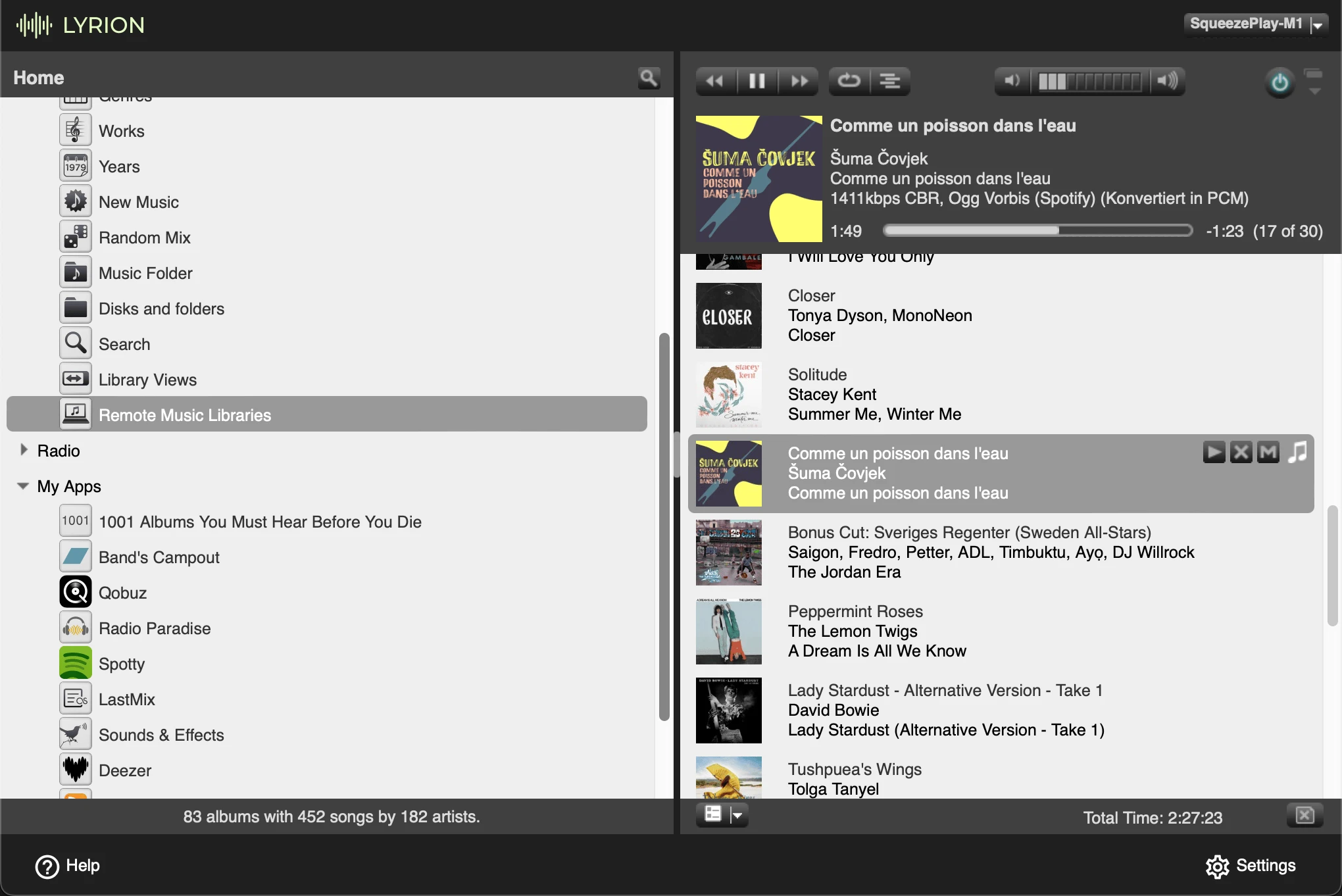
- Plugin Architecture: The functionality of Lyrion can be significantly extended through a rich ecosystem of third-party plugins. These can add support for online music services like Spotify, Qobuz, and Tidal, as well as internet radio stations, podcasts, and even smart home integrations.
- Tag-Based Library Management: Lyrion indexes file metadata such as artist, album, genre and year. Good tags and embedded artwork help browsing; optional plugins can retrieve additional information. It is not a promise that the server rewrites every file with corrected tags automatically.
- Web-Based Interface: You can manage your Lyrion server and control playback through a simple and effective web interface, accessible from any device with a browser on your network.
- Cross-Platform Compatibility: The Lyrion server software can be installed on a wide range of operating systems, including Linux, Windows, macOS, and various NAS operating systems.
A Nod to the Past: The Squeezebox Legacy
To truly understand Lyrion, we must pay homage to the Squeezebox. Developed by Slim Devices and later acquired by Logitech, Squeezeboxes were a revolutionary line of network audio players. These elegant devices could connect to your home network and stream music from the Logitech Media Server (now Lyrion). They were celebrated for their excellent audio quality, user-friendly interfaces, and the very multi-room synchronized playback that remains a cornerstone of Lyrion.
Though Logitech discontinued the Squeezebox hardware in 2012, a dedicated community has kept the spirit alive. Many Squeezebox devices are still in active use today, and the open-source nature of the server software has allowed for the development of numerous software and hardware players that emulate the Squeezebox functionality. This deep integration means that if you're lucky enough to own a classic Squeezebox, check the player model, firmware and current server compatibility. Existing hardware often remains useful, but “Squeezebox” does not guarantee every device or online service works without configuration.
Integrating Lyrion into Your Homelab
Bringing Lyrion into your homelab is a straightforward process for anyone familiar with self-hosting. Here's what you'll need and a brief overview of the setup:
Hardware Requirements:
Lyrion is remarkably lightweight and can run on a variety of hardware. Popular choices for a homelab setup include:
- Raspberry Pi: A Raspberry Pi 4 or newer is an excellent, low-power, and cost-effective option for running a Lyrion server, especially for smaller to medium-sized music libraries.
- Existing Homelab Server: If you already have a server running other services (perhaps in a Docker environment), Lyrion can easily coexist as another container.
- Dedicated PC or NUC: For very large music libraries or if you plan to do a lot of transcoding, a more powerful machine might be beneficial.
Installation Overview:
The installation process will vary depending on your chosen hardware and operating system. However, here are the general steps:
- Prepare Your Music Library: Organize your music files in a central location. This could be a hard drive attached to your Lyrion server or a network share (SMB/NFS) from your NAS.
- Install the Lyrion Server Software:
- For Raspberry Pi: You can install Lyrion directly onto Raspberry Pi OS using the
.debpackage from the Lyrion website. - Using Docker: This is a popular and flexible method for homelabbers. A pre-built Docker image for Lyrion is available on Docker Hub, making deployment as simple as running a
docker-composefile. This is often the recommended approach for its isolation and ease of management.
- For Raspberry Pi: You can install Lyrion directly onto Raspberry Pi OS using the
- Configure Lyrion: Once installed, you can access the Lyrion web interface by navigating to
http://<your-server-ip>:9000. From here, you will be guided through the initial setup, which includes pointing Lyrion to your music library. Lyrion will then scan your files and build its database. - Set Up Your Players:
- Software Players: You can use software players like Squeezelite on a computer or a Raspberry Pi connected to a DAC and your stereo system. There are also apps available for your smartphone that can act as both a remote control and a player.
- Hardware Players: If you have a Squeezebox or other compatible hardware player, you can configure it to connect to your new Lyrion server.
Cons and Considerations Before You Dive In
While Lyrion is a fantastic service, it's important to be aware of some potential drawbacks and considerations:
- The DIY Factor: Unlike polished commercial services like Roon, Lyrion requires a bit more hands-on setup and configuration. While the documentation is excellent, be prepared to get your hands a little dirty in the command line, especially if you're not using a straightforward Docker installation.
- User Interface: The default web interface of Lyrion is functional but can feel a bit dated compared to modern music applications. There are alternative skins and remote control apps that can provide a more contemporary experience, but this adds another layer of setup.
- Music Discovery: While Lyrion excels at playing the music you own, its built-in music discovery features are not as sophisticated as those found in services like Roon or streaming platforms like Spotify.
- Initial Investment: While the software is free, you will need to provide the hardware to run the server. This could be a new purchase if you don't have a suitable device already in your homelab.
- Maintenance: As with any self-hosted service, you are responsible for maintaining it. This includes updates, backups, and troubleshooting any issues that may arise.
Conclusion: The Sweet Sound of Self-Hosted Music
Lyrion Music Server stands as a testament to the power of open-source and community-driven development. It offers a robust, flexible, and highly rewarding way to manage and enjoy your digital music collection. For the self-hosting enthusiast who values control, customization, and the satisfaction of building their own digital ecosystem, Lyrion is an exceptional choice.
By reviving the legacy of the Squeezebox and empowering users to create a truly personalized music experience, Lyrion offers more than just a service—it provides a platform for rediscovering and reconnecting with the music you love. So, fire up that Raspberry Pi, dust off those FLAC files, and get ready to compose your own perfect homelab harmony with Lyrion.
Docker Networking and Persistent Storage for LMS
Deploying the official community image (lmscommunity/lyrionmusicserver:stable) in Docker Compose requires exposing three key ports: 9000 for the Web UI, 9090 for the TCP CLI; HTTP JSON-RPC uses /jsonrpc.js on the web port, and 3483 (both TCP and UDP) for the SlimProto audio synchronization protocol:
services:
  lms:
    image: lmscommunity/lyrionmusicserver:stable
    container_name: lyrion-music-server
    restart: unless-stopped
    ports:
      - "9000:9000/tcp"
      - "9090:9090/tcp"
      - "3483:3483/tcp"
      - "3483:3483/udp"
    environment:
      - PUID=1000
      - PGID=1000
      - TZ=Etc/UTC
    volumes:
      - ./lms-config:/config:rw
      - ./lms-playlists:/playlist:rw
      - /mnt/nas/media/music:/music:ro
Note on Local Player Discovery: If you plan to use the AirPlay Bridge, Chromecast Bridge, or UPnP/DLNA Bridge plugins so Lyrion can stream directly to existing smart speakers on your LAN, host networking can simplify local discovery, but remove the ports section when using it and check host-port conflicts. Bridge networking can also work with the appropriate announced server address and plugin-specific configuration; multicast and firewall rules still matter.
Check that the music share is mounted and readable before scanning. The example's PUID and PGID must correspond to a user with the required access, while configuration and playlist storage must be writable. A missing NAS mount can make an existing music path look empty. Keep configuration, playlists and the original music library backed up independently.
The image publisher documents one-to-one mapping for advertised HTTP and CLI ports. If you change the web port, configure the image's HTTP_PORT and matching port mapping instead of changing only the host side. Some plugins also need the reachable host address advertised. Keep player and control ports on trusted networks; port forwarding is not required for ordinary home playback.
Raspberry Pi Players, piCorePlayer and Audio Checks
piCorePlayer combines a small Linux system with the Squeezelite player and can use compatible audio hardware. A USB DAC or suitable HAT can make a Pi a useful endpoint, but check support for the particular Pi model, driver and output device before buying parts.
Its RAM-based design reduces routine SD-card writes. Saving configuration still writes persistent data, and a server/music-storage setup has additional considerations. The piCorePlayer “backup” operation saves selected configuration for restoration at boot; it is not automatically an independent disaster-recovery backup. Do not interpret the design as zero risk to every connected disk during every power interruption.
For synchronized rooms, begin with two compatible players on a reliable network and the same track. Listen across adjoining rooms and check for drift or dropouts over time. A bridge to another speaker ecosystem can introduce different buffers and latency; there is no universal sub-millisecond guarantee for every device.
For bit-perfect playback, verify that the selected player, DAC and format support the intended sample rate and that volume processing, resampling, DSP or transcoding do not alter the stream. A lossless file on the server does not by itself prove the final output is unchanged. The goal is a known playback chain, not a promise of better sound from any one container or cable.
Choose Plugins for Your Listening Habits
Use the plugin manager and each plugin's current documentation to check compatibility with your server release. Material Skin can offer an alternative interface; music-information extensions can add biographies or artwork; bridge plugins can connect supported AirPlay, Cast or UPnP devices. Choose what you need and verify one extension at a time.
Streaming integrations depend on service accounts, subscriptions, region and current APIs. A list mentioning Spotify, Qobuz or Tidal is not a guarantee that every catalogue is available or lossless through every plugin. The screenshot illustrates one configured server and player; its visible services and track format do not establish support or audio quality for your own account.
Plugin code and online lookups also affect maintenance and privacy. Keep a copy of your working configuration before enabling new plugins, record the versions and test a restart. Local-file playback, internet radio and subscription streaming use different paths: if a local file works while an online station fails, check that service, credentials and network access before rebuilding the whole server.
Build your first library from a small set with clear tags, then scan the larger collection once browsing and playback work. Compare album grouping, multi-disc ordering and compilations before bulk editing files. Retain original audio files and test restored playlists; a library index can be rebuilt, but a deleted music file needs a real backup.