The Network screen in Proxmox asks several different questions at once. Which network should this guest join? What kind of virtual network card should it see? Does the Firewall checkbox actually protect it? Later, the Firewall menus appear again under the datacenter, the host and the guest, making it easy to change the right-looking option in the wrong place.
Separate three jobs: connecting a guest to a network, giving it an address, and controlling which connections it may accept. A bridge handles the connection. IP settings handle addressing. Firewall rules handle access. None automatically completes the other two jobs.
This standalone explainer picks up the questions deferred in our WordPress container guide and NGINX container guide. It uses documented behaviour and credited reference screenshots, rather than claiming a new installation or firewall test on our hardware. The main examples concern ordinary Linux bridges and the established pve-firewall backend. Version-sensitive details were checked on 9 November 2026; use your installed release's Help button when labels differ.
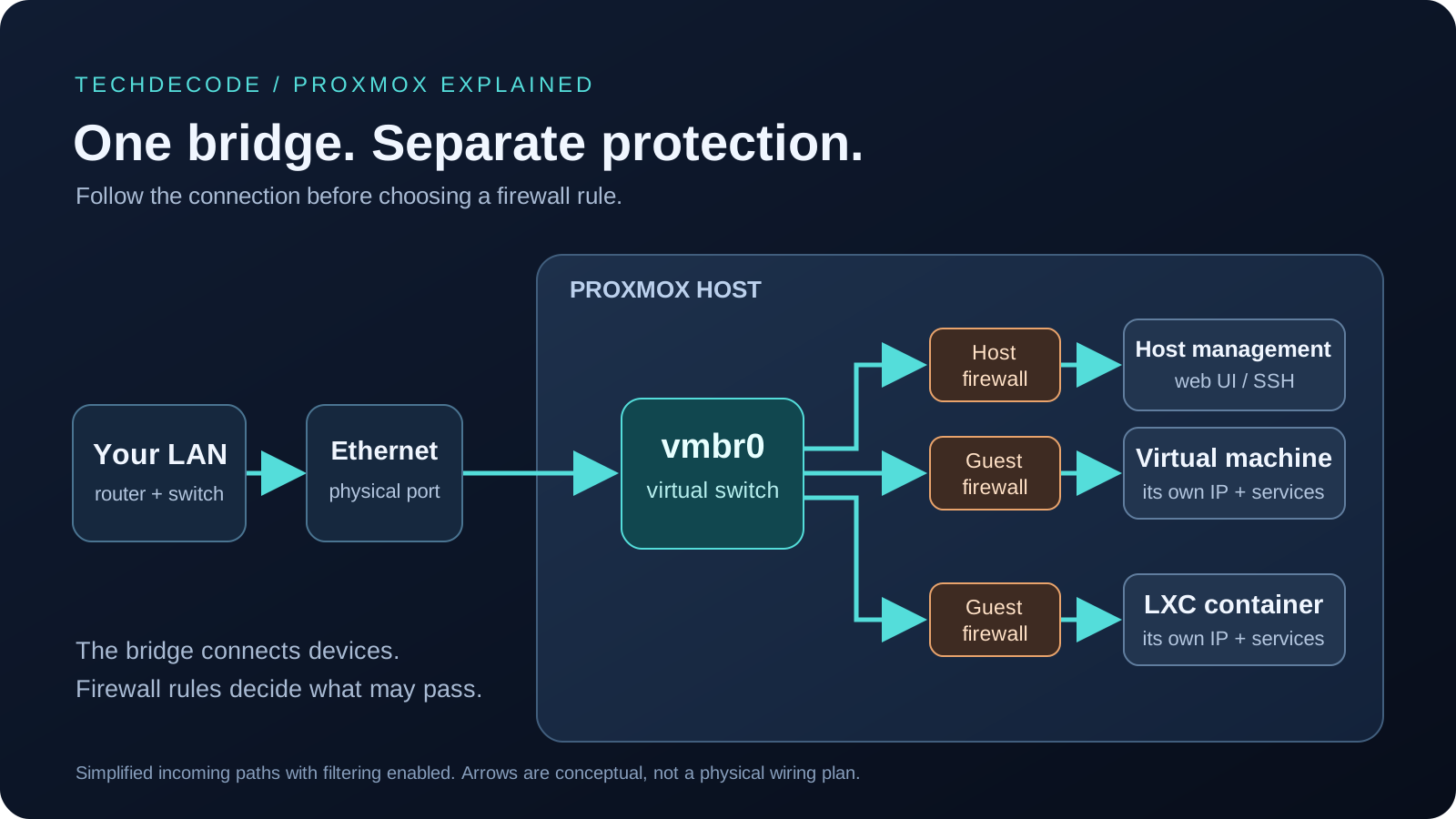
Follow the connection through vmbr0
A bridge is a software Ethernet switch. On a typical Proxmox installation, vmbr0 connects the server's physical Ethernet port to the virtual interfaces of its guests. The port might be named eno1, enp3s0 or nic0; these are device names, not IP addresses. Your installation may instead use a bonded pair of physical ports or a different bridge name.
Imagine a home LAN, or local area network, with its router at 192.168.1.1. The Proxmox host might use 192.168.1.2, while a web-server guest uses 192.168.1.50. The guest has its own address and Ethernet identity, even though its traffic uses the same physical cable. It does not borrow the host's IP address because both attach to vmbr0.
The host's management address commonly sits on the bridge interface. That address belongs to the host operating system; it is not handed to every guest. A bridge can also carry guest traffic without having a host IP address of its own.
An ordinary bridge does not provide a DHCP server, invent a gateway or perform NAT, the address translation commonly used by home routers. Usually your router still supplies addresses and handles internet traffic. Proxmox also supports routed, NAT and software-defined networks, but selecting vmbr0 does not enable those features. The official network guide describes the different layouts.
A bridge without a physical uplink can connect guests internally. That is a topology choice, not a complete security guarantee: a guest attached to another network can route traffic between them if configured to do so. Open the connection-path diagram at full size.
Understand the VM Network screen
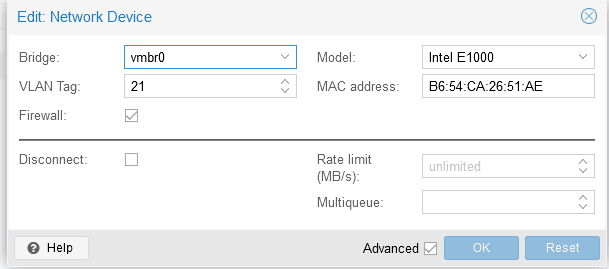
For an existing virtual machine, open Hardware, select its network device and choose Edit. During creation, use the Network tab. A NIC, or network interface controller, is the network card the guest sees.
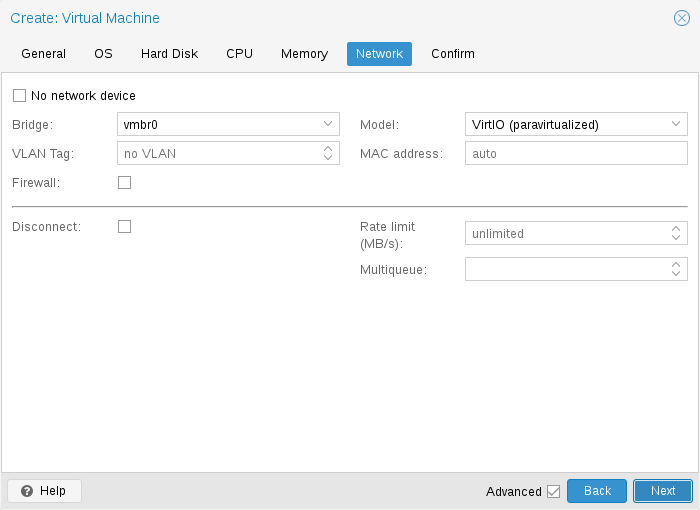
Select any screenshot to open the full-size image in a new tab, where you can zoom into its labels.
| Setting | Meaning and starting point |
|---|---|
| Bridge | The virtual switch this interface joins. Choose the bridge connected to the intended network, commonly vmbr0. |
| VLAN Tag | The virtual LAN assigned to this interface. Leave blank for an ordinary untagged LAN; enter a tag only when the network supports it. |
| MAC address | The interface's Ethernet identifier, also used for many DHCP reservations. Usually keep the generated value. |
| Firewall | Selects this interface for guest filtering. Additional datacenter and guest switches must be enabled. |
| Disconnect | Simulates an unplugged cable. Leave unchecked for normal connectivity. |
| Rate limit | Caps traffic in megabytes per second, shown as MB/s, not megabits per second (Mbps). Leave unset unless you need a cap. |
The Model determines how the guest talks to its virtual card. VirtIO is designed for virtual machines: its driver cooperates with the hypervisor instead of pretending to be an old physical card. It is a sensible choice for modern Linux and Windows with the appropriate VirtIO driver installed. A Windows installer that cannot see this adapter may need its driver; that is not a firewall failure.
Intel E1000 emulates a widely supported Intel card. It can help when a guest lacks VirtIO support, at the cost of additional emulation work. VMXNET3 is another virtualisation-aware adapter, mainly relevant when importing a VM that already expects it. These names are not speed guarantees. Proxmox can choose a model based on the selected operating system, so there is no universal wizard default. See the NIC documentation and OS-specific defaults.
Changing an established VM's model can change its driver and the interface its OS recognises. Have console access and record the guest's IP configuration first.
Optional: MTU and multiqueue
MTU is the maximum packet size an interface can carry at its network layer. Leave the inherited/default value unless the relevant path supports a different size. Bigger is not automatically faster; mismatches can cause connections that partly work and then stall. The VM MTU override is a VirtIO feature; blank or 1 inherits the bridge MTU in the checked documentation.
Multiqueue spreads VirtIO packet processing across multiple queues. It also needs guest support and configuration and can add overhead. Leave tuning for a measured workload after connectivity works. The exact advanced fields appear in Proxmox's network-device editor.
Give the guest an address, gateway and DNS
Selecting a bridge does not assign a VM's IP address. Configure networking inside the VM's operating system, or let it obtain settings through DHCP, which leases addresses from a server on that network. Cloud-Init can provision compatible images, but it is a separate mechanism.
An LXC container is more closely integrated with Proxmox, which exposes its IP settings in the container's Network screen. LXC uses Linux virtual interfaces rather than emulating an E1000 card, so it has no equivalent Model dropdown. Its interface name, commonly eth0, is the name inside the container. Our LXC versus VM comparison explains the wider distinction.
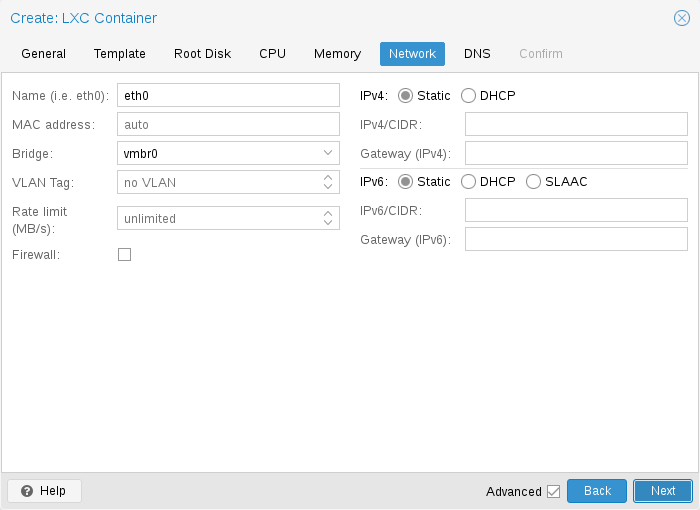
A router's DHCP reservation can keep a guest's address predictable while managing it centrally. With Static, you choose a suitable unused address and ensure that DHCP will not assign it to another device.
For example, 192.168.1.50/24 combines an address with a network prefix. The /24 describes the subnet, corresponding here to 255.255.255.0; it is not a port number. In this example, 192.168.1.1 is the router and default gateway for reaching other networks. Substitute your real subnet and gateway. Our subnetting explainer covers the notation.
DNS converts names into addresses. Configure a container's DNS separately under DNS; VMs normally use their own OS settings. If an application works by IP but not by name, check DNS before changing firewall rules. With multiple interfaces, adding a default gateway to each can create confusing routing choices. Start with one intended default route.
IPv6 has separate addresses, routes and automatic configuration. Do not assume IPv4 settings cover both families. The container network editor presents them separately.
Use VLAN tags with an end-to-end plan
A VLAN, or virtual LAN, separates Ethernet traffic into logical networks on shared equipment. A homelab might separate trusted computers from smart devices. The VLAN number identifies the network; it does not determine the IP range automatically.
On a VLAN-aware Linux bridge, assigning VLAN Tag 30 to an ordinary guest interface puts it on VLAN 30. Proxmox handles tagging at that boundary, so the guest uses an untagged interface internally. You generally should not also configure VLAN 30 inside that guest for the same simple arrangement.
The guest tag, bridge configuration and upstream switch/router configuration must agree. If VLAN 30 must leave the host, the switch port must carry that tagged network. The router needs the corresponding VLAN interface, addressing and any required DHCP service. An unmanaged switch and ordinary router do not gain those capabilities when you enter a number in Proxmox.
A trunk deliberately carries multiple tagged networks into a VLAN-aware guest, such as a virtual router. It requires guest-side configuration and an explicit allowed-VLAN design. It is an advanced arrangement, not the next checkbox every guest needs. A blank guest tag is not proof that the guest has been securely isolated from every other VLAN.
VLANs separate Ethernet networks; a router's policy determines which connections cross between them. If it permits all inter-VLAN traffic, a different VLAN does not by itself prevent access to a service. Devices within one VLAN can also need endpoint filtering. Consult the official VLAN configurations before changing an uplink.
Moving the host's management address to a different VLAN can disconnect you. Proxmox stages host-network edits and Apply Configuration applies them live with ifupdown2; it does not promise automatic rollback. Arrange physical or independent remote-console access first. Do not casually bring down vmbr0 while your guests depend on it.
Know which firewall you are configuring
A firewall decides whether traffic is allowed, but it needs a clear target. Datacenter means Proxmox's top-level configuration, even with only one server. A node is the physical host. A guest is a VM or container.
An IP address identifies a network endpoint; a port number identifies a service there. TCP carries data through an ordered, reliable connection, while UDP sends individual messages without that delivery guarantee. Firewall rules distinguish the two protocols even when the port number is identical. SSH, or Secure Shell, provides encrypted command-line access.
Datacenter and node rule lists concern the hosts. A guest rule list concerns that guest. Allowing TCP 8006 for the host's web interface does not allow TCP 443 into a web-server VM. A guest SSH rule protects that guest's SSH service, not the host's.

Open the datacenter rule list at full size to inspect the columns on a small screen.
The switches have distinct jobs:
| Location | Purpose |
|---|---|
| Datacenter → Firewall → Options → Firewall | Global enable gate. Disabled by default in the checked configuration. |
| Node → Firewall → Options → Firewall | Host protection, enabled by default but dependent on the datacenter gate. |
| VM or CT → Firewall → Options → Firewall | That guest's protection. Disabled by default in the checked configuration. |
| Guest NIC's Firewall checkbox | Selects which guest interfaces participate. New-interface wizards commonly check it already. |
For guest filtering, the combination is datacenter enabled + guest enabled + relevant guest NIC enabled. The node's host-firewall switch is separate, not another mandatory gate in that chain. A checked NIC box alone does not protect the guest. The firewall implementation and option definitions confirm this distinction.
The global switch can activate host filtering and previously configured rules for other guests. Inspect existing settings first; it may affect more than the guest currently selected.
Read rules from the protected machine's perspective
IN means arriving at the protected host or guest; OUT means leaving it. They do not mean internet versus LAN. A laptop connecting to a guest's web server is an IN connection for that guest, even on the same local network.
ACCEPT permits matching traffic. DROP discards it without a rejection response. REJECT refuses it with a response where supported; backend differences are covered below. A rule must also have Enable checked. A visible disabled rule does nothing.
Source identifies where the connection comes from; Destination identifies where it goes. For HTTPS, use destination port 443 and protocol TCP. The client's source port is normally a temporary port chosen for that connection, so entering source port 443 is a common mistake. A TCP rule does not also permit UDP on that number.
Regular user rules are evaluated in order; the first matching enabled decision matters. Place a specific exception before a broader block. When nothing matches, Input Policy or Output Policy supplies the fallback. Guest defaults are Input DROP and Output ACCEPT, subject to built-in connection-state and protocol exceptions.
Node rules precede datacenter rules for host traffic. This is not a universal chain through which every guest packet passes. Shared security groups can distribute selected rules, but datacenter host rules do not automatically become every guest's service policy.

Open the container rule list at full size to inspect its service macros.
The stock firewall tracks connections, normally admitting established or related traffic before regular user rules. An already-open browser or SSH session can therefore mislead you after a restrictive change. Test a new connection. The rule editor and firewall reference describe the controls and default exceptions.
Plan a small guest policy before enabling it
Consider a web-server guest at 192.168.1.50, already serving HTTPS on TCP 443. Trusted clients use 192.168.1.0/24; the administrator's computer is 192.168.1.10. We want HTTPS from that subnet and SSH only from the administrator. This is an illustrative policy, not a tested installation report.
The enabled rules in the guest's Firewall list would be:
| Direction / action | Source | Protocol / destination port |
|---|---|---|
| IN / ACCEPT | 192.168.1.10/32 | TCP / 22, if SSH is needed |
| IN / ACCEPT | 192.168.1.0/24 | TCP / 443 |
Here /32 means one IPv4 address. Leave source port unrestricted. For a single-interface guest, leave Interface unrestricted or select its correct interface, usually net0. Input DROP provides the ordinary fallback; Output ACCEPT lets the guest initiate connections, including updates. This is not an outbound containment policy for a compromised server.
Adapt the rules to the real application first. A reverse proxy may be the source a backend sees, so allow its appropriate address. A service listening on 8443 needs that actual port: permitting 443 neither reconfigures the application nor installs a certificate. Monitoring, backup agents, databases and administrative tools may require additional narrowly scoped permissions.
Start with a nonessential guest, a backup and working console. Record existing options and rules, and confirm the service works before filtering. Prepare management access as described next, then enable the intended gates. Test fresh HTTPS from an allowed client, fresh SSH from the administrator and a denied connection from outside the permitted source range. Confirm the service remains running when evaluating a denial; a stopped service proves nothing about filtering.
These IPv4 source ranges do not grant equivalent IPv6 access. If the service is reachable over IPv6, define and test that policy too. A DNS name may select either address family.
Keep access to the Proxmox host
Prepare host management before enabling the datacenter switch. The host web interface normally uses TCP 8006, while SSH uses TCP 22. Those are different endpoints from a guest's web ports.
Record the source address from which you administer the host, including any VPN or routed management network. Prepare host-scope allow rules for the necessary services from those sources. Proxmox also has a special management IP set for built-in management exceptions; it grants that defined management access, not just one arbitrary application port. It is not a generic guest allow-list.
The stock firewall permits some management, cluster and established traffic automatically. Do not assume it will recognise an administrator arriving through another subnet or VPN. A cluster or shared-storage installation must also preserve its required cluster, migration and storage communications. A single-node example is not a complete cluster policy.
Keep an existing SSH session open as an additional recovery route, and have physical console access or an independent remote-management console available. The old SSH session is helpful with stock stateful rules, but does not prove new connections will succeed or rescue every network mistake. After each change, test a fresh web connection and, where required, a fresh SSH connection before closing recovery access.
If something fails, use the console to undo the specific change. Stopping pve-firewall is a stock-backend emergency action that removes its generated filtering on that node, affecting more than one troublesome rule. It is not a narrow rollback or the correct command for every backend. Avoid generic instructions to flush the entire host firewall. Proxmox's management-access guidance explains the preparation.
Optional controls and backend differences
Security groups package reusable rules, such as monitoring-server access. Define a group centrally, then insert it into the appropriate guest list; its position matters. Aliases give addresses memorable names, while IP sets collect addresses or networks. They make policies easier to maintain but do not apply themselves merely by existing.
MAC filter checks a guest's outgoing Ethernet identity against its configured MAC. IP filter restricts outgoing source addresses: it prevents address spoofing rather than providing a destination allow-list. Account for legitimate VM addresses, including IPv6. Container addresses configured through Proxmox can be included automatically. Turning this on without understanding a dynamically addressed guest can break connectivity.
The guest DHCP firewall option permits DHCP exchanges; it does not create a DHCP server. NDP, the IPv6 neighbour-discovery protocol, supports essential local IPv6 communication. Router Advertisement permits a guest to send router advertisements. Ordinary guests do not need that option merely to receive network information.
The established pve-firewall implementation uses iptables; the newer proxmox-firewall uses nftables. As checked on 9 November 2026, official documentation still marks the latter as a technology preview and unsuitable for production use. Do not switch backends just to match a tutorial's screen.
FORWARD and software-defined VNet (virtual network) rules require the newer backend; the stock backend ignores them. In the newer implementation, guest REJECT currently drops traffic instead, guest rules can affect tracked connections too, and switching backend requires restarting running guests. Consult release-matched instructions rather than combining the two implementations. Ordinary bridged guest IN/OUT filtering does not require a backend migration.
Troubleshoot in connection order
First check whether the guest is running and its interface joins the intended bridge. Check the virtual Disconnect setting, physical link and guest driver. If the problem followed a VLAN change, inspect the tag and upstream port before changing application settings.
Inside a Linux guest, these read-only commands show addresses and routes:
ip -br address
ip route
ip -6 route
Use its console if network access is unavailable. A missing address points toward DHCP or static configuration; the wrong default route affects access outside the subnet. Next, test the actual service and name resolution. Ping uses ICMP: success does not prove TCP 443 is open, and a blocked ping does not prove the web service is down.
On the Proxmox host, these read-only checks help identify another layer:
bridge vlan show
pve-firewall status
The first shows bridge-port VLAN membership. The second reports the stock firewall's status and configuration warnings; it is not an end-to-end connection test or an nftables-backend diagnostic. Use the newer backend's own documented service checks if you have deliberately selected it.
For a reachable guest whose service fails, inspect its listening address, its operating-system firewall, Proxmox guest rules and any router policy on the path. Temporarily enable targeted rule logging when needed and inspect Firewall → Log. Avoid unnecessary permanent verbose logging. Test with the intended client source and a fresh connection.
Keep the three jobs separate: bridge and VLAN choose the network, IP settings make the guest reachable, and firewall rules limit access. Get one guest working, add a small explicit policy, verify allowed and blocked traffic, then reuse the design. You will have a configuration you can explain and recover, rather than a collection of checked boxes.