
If you run a WordPress website, a self-hosted Nextcloud server, or a handful of Docker containers in your homelab, drop what you are doing and check your PHP versions today. Over the past forty-eight hours, the security world has been scrambling to respond to a pair of critical vulnerabilities in the core PHP language engine known collectively as PHP2Shell (CVE-2026-109618 and CVE-2026-109619).
Both flaws carry a Critical 9.2 CVSS severity rating, both allow an unauthenticated attacker to run arbitrary commands on a vulnerable web server over the internet, and because technical details leaked publicly on 20 October 2026 just ahead of the official 21 October 2026 emergency patches, automated scanners are already probing servers in the wild.
The most important thing to understand right up front is where this bug lives. PHP2Shell is not a bug in a sloppy WordPress plugin or a third-party Nextcloud add-on. It sits inside the underlying PHP engine itself. That means clicking "Update Plugins" inside your website dashboard will not fix it, and if you run apps inside Docker containers, simply updating your Ubuntu or Proxmox host will not fix those containers either.
Here is a plain-English breakdown of what PHP2Shell actually does, how to check whether your website or homelab is exposed, and the exact steps to patch both traditional Linux servers and Docker containers safely.
What Is PHP2Shell, in Plain English?
Still powering more than three-quarters of websites with a known server-side language, PHP is the engine underneath massive platforms like WordPress, Nextcloud, BookStack, Firefly III, Matomo, and dozens of popular homelab dashboards.
Normally, when someone visits a PHP website or uploads a file, two things happen in order:
- The PHP engine (written in the C programming language) reads the incoming web request, sets aside temporary memory for any form fields or uploaded files, and prepares a clean workspace.
- Your PHP application (such as WordPress or Nextcloud) runs its code, checks whether the visitor is logged in, and decides what to do.
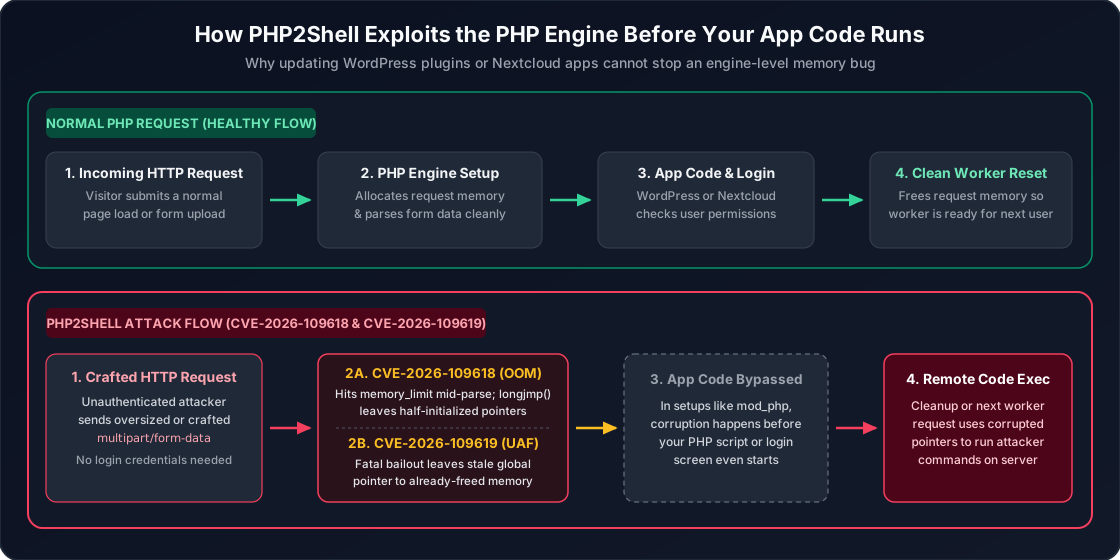
PHP2Shell breaks Step 1. Because the vulnerability lives in the low-level C code that sets up and cleans up requests inside the PHP interpreter, an attacker can trigger it while PHP is still reading the incoming request, before a single line of your website's login check or security plugin ever runs.
How the Two Vulnerabilities Work (Without a Computer Science Degree)
Although everyone is calling the crisis "PHP2Shell", the emergency update on 21 October 2026 actually patches two closely related memory flaws that affect PHP versions going all the way back to the PHP 5 era.
1. CVE-2026-109618: The Out-of-Memory Bailout Flaw
Every PHP server has a safety setting called memory_limit that stops a single web request from eating all of your server's RAM. When a request hits that ceiling, PHP performs an emergency bailout (using a C function called longjmp()) to abort the request and clean up after itself.
Think of it like a restaurant waiter writing down a massive, complicated table order on a notepad. Under CVE-2026-109618 (GHSA-w8hw-w9fx-j79w), an attacker sends a specially crafted request (such as a multipart/form-data upload) designed to hit the memory limit at the exact microsecond when PHP has only half-finished setting up its internal memory pointers. When the emergency bailout triggers, PHP's cleanup crew steps in, assumes the half-written notepad is complete, and follows invalid memory pointers. By carefully shaping the request, an attacker can turn that corrupted cleanup into Remote Code Execution (RCE), forcing the server to run their own commands.
2. CVE-2026-109619: The Leftover Worker Memory Flaw (Use-After-Free)
For speed, modern web servers do not start a brand-new PHP process from scratch for every single visitor. Instead, runtimes like Apache mod_php, PHP-FPM, FrankenPHP, and LiteSpeed keep a pool of persistent "worker" processes alive in RAM. When Worker #1 finishes helping Visitor A, it wipes its slate clean and immediately helps Visitor B.
Under CVE-2026-109619 (GHSA-6wmf-4rv5-p3rp), if a request crashes or aborts at the wrong moment (for instance, while tracking session upload progress), a global pointer inside that PHP worker fails to reset properly. The memory it points to is freed, but the pointer itself stays behind like a sticky note pointing to an empty locker. When the very next request lands on that same worker process, PHP can read or jump through that leftover pointer before normal initialization happens. In security terms, this is called a Use-After-Free (UAF) bug, and it also allows an unauthenticated attacker to hijack the worker process.
Who Is Affected (And How Urgent Is This for Your Homelab)?
Because these bugs sit in the core PHP interpreter, almost every unpatched PHP deployment is technically vulnerable, including:
- Runtimes: Apache with
mod_php(considered the highest-risk configuration because request parsing happens directly inside the web server worker), PHP-FPM (used behind Nginx, Caddy, and Traefik),php-cgi, FrankenPHP, and LiteSpeed. - Popular applications: WordPress, Nextcloud, BookStack, Firefly III, Snipe-IT, Monica, Kanboard, Invoice Ninja, LibreNMS, Zabbix web frontends, and any custom PHP site.
However, your real-world urgency depends on how your server is connected to the network:
- Immediate High Risk (Publicly Exposed Services): If your WordPress site runs on a cloud VPS, or if you expose Nextcloud or another PHP app from your homelab to the public internet through router port forwarding, a reverse proxy, or a public Cloudflare Tunnel, anyone on the internet can send requests to your PHP engine. You should patch immediately (or take the public route offline until patched). Even putting an authentication page inside the PHP app does not protect you, because the flaw triggers before PHP runs your app's login check.
- Lower Immediate Risk (VPN-Only Homelab Services): If your self-hosted PHP apps are reachable only on your home Wi-Fi or through a private VPN like WireGuard or Tailscale, internet bots cannot reach your web server to exploit it. You should still update your containers and VMs as part of good cybersecurity hygiene, but you do not need to panic or pull your home LAN offline tonight.
Which PHP Versions Are Safe?
On 21 October 2026, the PHP release managers and The PHP Foundation shipped emergency security updates across all four supported branches.
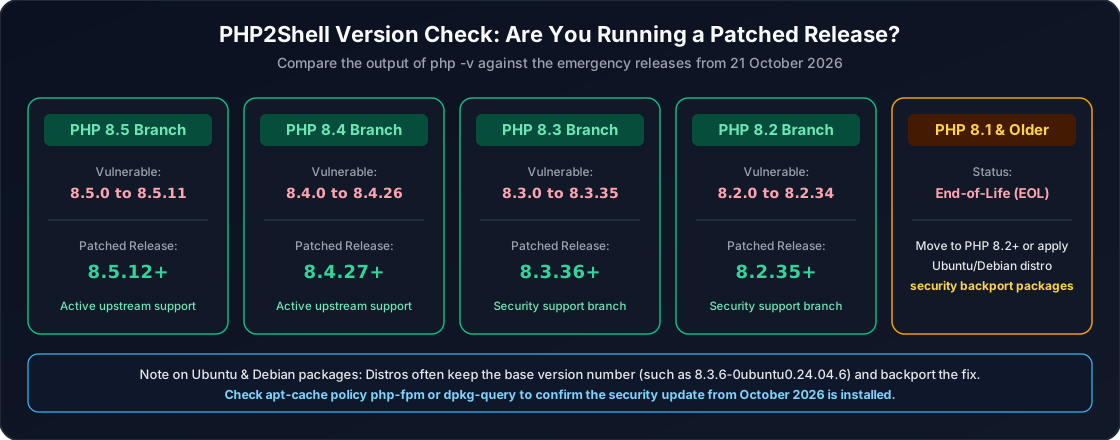
| PHP Branch | Vulnerable Versions | Patched Upstream Version | Support Status |
|---|---|---|---|
| PHP 8.5 | 8.5.0 through 8.5.11 |
8.5.12 (or higher) |
Active upstream support |
| PHP 8.4 | 8.4.0 through 8.4.26 |
8.4.27 (or higher) |
Active upstream support |
| PHP 8.3 | 8.3.0 through 8.3.35 |
8.3.36 (or higher) |
Security support branch |
| PHP 8.2 | 8.2.0 through 8.2.34 |
8.2.35 (or higher) |
Security support branch |
| PHP 8.1 & older | All 8.1.x, 8.0.x, 7.x, 5.x |
No official binary release | End-of-Life (EOL): Upgrade to PHP 8.2+ or rely on Ubuntu/Debian/RHEL vendor security backports |
Important Note on Ubuntu and Debian Version Numbers
If you install PHP directly from Ubuntu or Debian repositories (rather than Docker Hub or the ppa:ondrej/php repository), remember how Linux distributions handle security patches. Ubuntu 24.04 LTS, for example, ships PHP 8.3.6 and backports security fixes into that package without changing the 8.3.6 base number. Instead, the package suffix increments (such as 8.3.6-0ubuntu0.24.04.6). We show how to check that below.
The Homelab Docker Trap: Why Updating Your Host Server Is Not Enough
One of the easiest mistakes to make in a homelab is logging into your Proxmox host or your Docker VM, running sudo apt update && sudo apt upgrade, seeing zero errors, and assuming your self-hosted apps are now safe.
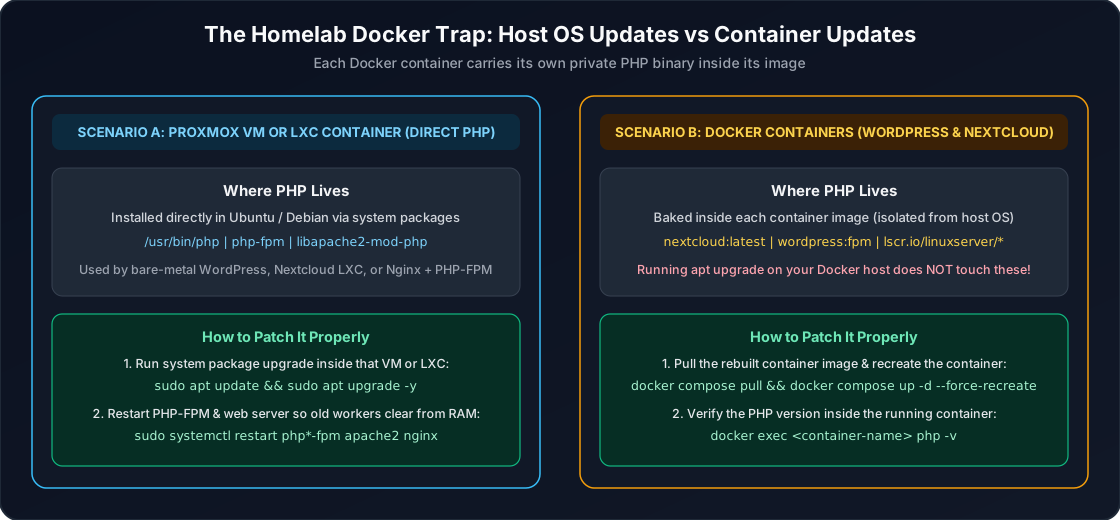
As the diagram above illustrates, a Docker container is a self-contained bundle. When you deploy nextcloud:latest, wordpress:fpm, or a LinuxServer.io image, that container brings its own private copy of Linux libraries and its own PHP binary inside the container image. Updating the host operating system outside the container never touches the PHP binary running inside the container.
To fix a Docker-based PHP app, the upstream image maintainer (Docker Official Images, Nextcloud, WordPress, or LinuxServer.io) must rebuild their image with the patched PHP runtime, and you must pull the new image and recreate your container.
Step-by-Step: How to Check and Patch Your Systems
Before running updates across critical services, take a quick snapshot of your VM or container in Proxmox Backup Server so you can roll back in thirty seconds if an application config ever misbehaves.
Scenario A: Bare-Metal Linux, Proxmox VMs, and LXC Containers
If you installed PHP directly inside an Ubuntu or Debian VM or an LXC container (for example, our Nextcloud LXC setup or a traditional LAMP/LEMP stack), log in over SSH and check your current PHP version:
php -v
If you use the popular Ondřej Surý repository (ppa:ondrej/php on Ubuntu or packages.sury.org on Debian) or upstream binaries, you want the version number to read 8.5.12, 8.4.27, 8.3.36, or 8.2.35 (or newer). If you use standard Ubuntu or Debian distro packages, check the installed package version and changelog to confirm the October 2026 security update is applied:
apt-cache policy php-fpm php-cli libapache2-mod-php*
To apply the latest security packages and, crucially, restart the running worker processes so no old, vulnerable PHP workers remain in RAM:
sudo apt update && sudo apt upgrade -y
Then restart your PHP-FPM service and web server (adjust php8.3-fpm to match your installed branch, such as php8.2-fpm or php8.4-fpm):
sudo systemctl restart php8.3-fpm
sudo systemctl reload nginx || sudo systemctl restart apache2
(Why is the restart mandatory? Because Linux keeps existing processes running in memory until they are restarted. If you upgrade the php-fpm package on disk without restarting the service, your live web workers will continue running the old vulnerable code in RAM.)
Scenario B: Docker Compose and Portainer Setups
First, list all of your running Docker containers and check which ones actually have PHP installed inside them. You can run this harmless one-line loop on your Docker host to inspect every running container at once:
for c in $(docker ps --format '{{.Names}}'); do
  ver=$(docker exec "$c" php -v 2>/dev/null | head -n 1)
  if [ -n "$ver" ]; then
    echo "$c -> $ver"
  fi
done
That command loops through every running container, quietly checks if php exists inside it, and prints the container name and exact PHP version for every match (such as nextcloud -> PHP 8.3.36 (cli)...).
To update your Docker Compose stack from the terminal:
docker compose pull
docker compose up -d --force-recreate
If you manage your stacks visually through Portainer, you can follow our guide on updating Docker containers in Portainer (or use Watchtower in Portainer for automated image pulls). After the container restarts, re-run the docker exec <container-name> php -v check to verify that the image you pulled already contains the patched PHP binary (8.5.12, 8.4.27, 8.3.36, or 8.2.35).
What If Your Docker Image Has Not Been Rebuilt Yet? (Temporary Mitigations)
Because container maintainers have to wait for base images (Debian/Alpine PHP packages) to finish building before they can republish application images like Nextcloud All-in-One (AIO) or specialized community containers, there can be a short delay between the PHP Foundation's source release and your specific Docker tag getting updated.
If docker exec <container> php -v shows that your container is still on an unpatched PHP version (8.3.35, 8.2.34, etc.), here is how to protect yourself in the meantime:
- Best option for homelabs: Temporarily disable public exposure. If you expose Nextcloud or another self-hosted PHP app to the internet through a reverse proxy or port forward, pause that public route and access the app over WireGuard or Tailscale until the rebuilt container image lands.
- Put Cloudflare WAF or reverse-proxy rules in front of public sites: Major cloud firewall providers have rolled out emergency WAF rules to block malformed
multipart/form-dataexploit payloads. - Temporary PHP configuration hardening (Advanced, partial mitigation only): Security researchers note that if you must keep an unpatched server online temporarily while waiting for a maintenance window, you can reduce the attack surface by combining three
php.ini/ PHP-FPM pool settings:- Disable session upload progress tracking (
session.upload_progress.enabled = 0) to block a primary vector forCVE-2026-109619. - Lock
php_admin_value[memory_limit] = -1in your PHP-FPM pool (while relying on outer Docker container--memory/ cgroup limits so the whole container terminates cleanly on runaway RAM rather than triggering PHP's vulnerable internallongjmp()bailout). - Keep
post_max_sizeandupload_max_filesizeas small as your site allows.
- Disable session upload progress tracking (
Keep in mind that configuration tweaks only make exploitation harder; upgrading to PHP 8.5.12, 8.4.27, 8.3.36, or 8.2.35 (or your Linux distribution's patched October 2026 package) is the only complete cure.
Final Takeaway
Core interpreter vulnerabilities like PHP2Shell do not come along very often, which is exactly why they catch so many administrators off guard when they do. Take five minutes today to run php -v on your Linux servers and docker exec <container> php -v across your homelab containers. Once your PHP runtimes are updated and your worker services are restarted, you can get back to enjoying your self-hosted stack with peace of mind.