Your overnight backup fails, but everything still looks normal the next morning. The applications open, the server is running, and you have no reason to visit the Proxmox dashboard. You might only discover the problem when you need that backup.
Email notifications give your homelab a way to get your attention. Instead of checking every job yourself, you receive a message when something needs investigating. Selected success messages can also help you notice when an expected report is missing. Automatically detecting an overdue job requires a separate check.
This guide compares free services that can deliver those messages to your normal inbox. We focus on Proxmox, explain the main setup choices and pick a winner. Exact settings and a demonstrated installation will follow in a separate walkthrough.
Our free-tier winner for a typical small Proxmox homelab is Resend. Its allowance, approval-free activation and useful delivery history are a good balance for beginners who own a domain. Sender offers more capacity, while Brevo is another strong alternative. These are recommendations from current documentation, not results from a hands-on delivery-speed or spam-folder comparison. Plan details were checked on 3 November 2026.
Why use an email service for your homelab?
Proxmox can generate notifications for completed or failed backups and failed storage replication, where data is copied between hosts. Those are useful starting points: a backup failure deserves attention even when the application itself still works. The Proxmox notification documentation lists the supported events.
The email service handles delivery. It does not create backups or decide whether your photo library is healthy. Checking whether an application is available requires a suitable monitor, such as Uptime Kuma, configured separately.
Using an external service also means you do not need to operate a complete internet-facing mail server just to receive a few alerts. You keep using your existing Gmail, Outlook or other inbox. The new account provides the outgoing delivery service for your lab.
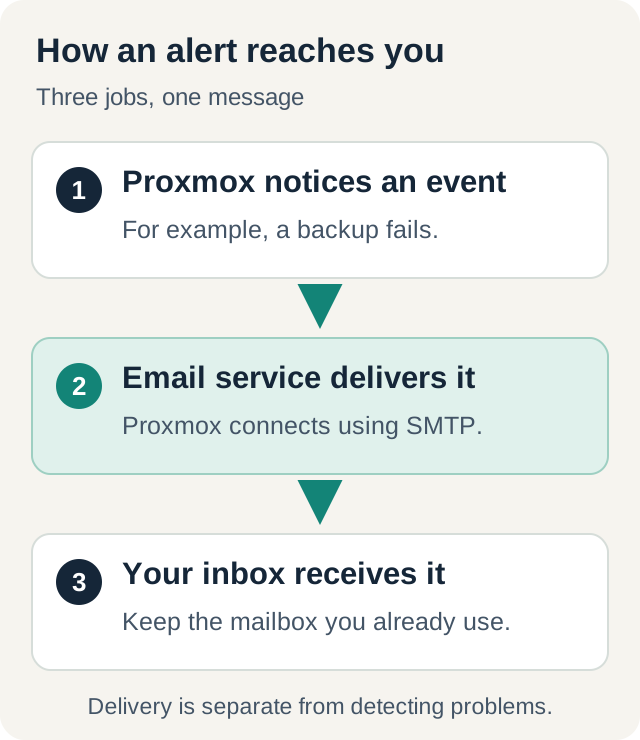
You will see two terms repeatedly. Transactional email means an automatic message triggered by an event, such as a failed backup. SMTP, short for Simple Mail Transfer Protocol, is the standard way Proxmox can hand that message to an email service. All the recurring free options in the next table advertise SMTP support; you do not need to write an application to use it.
Compare the free plans
Monthly, daily and hourly limits apply together. A plan offering 3,000 messages per month and 100 per day does not let you send all 3,000 on Monday. “No daily plan limit” also does not mean unlimited sending speed: account-level restrictions can still apply.
This comparison covers dedicated email-sending services with documented SMTP access. The linked provider pages are the starting point for checking an offer before signing up. Marketing campaigns or incoming-email features can share the same quota on some services. We discuss using an existing mailbox separately below.
A domain is a name such as example.com, the part after @ in an email address. Delivery logs are records that help explain what happened to a message. On a narrow screen, scroll the tables sideways to see every column.
| Service | Free sending limit | Main catch for homelab alerts |
|---|---|---|
| Resend | 3,000/month; 100/day | Own verified domain for normal sending. Three domains and 30-day history included. |
| Sender | 15,000/month; no daily plan limit | Domain and account verification; business/website information requested. One-day logs and account-specific rate limits. No card required. |
| Brevo | 300/day | Unused sends do not roll over. Transactional activation may require support; excess messages can be delayed in a queue. |
| Mailtrap Email API/SMTP | 4,000/month; 150/day | One domain, three-day logs and compliance checks. Choose Email API/SMTP, not Email Sandbox. |
| SMTP2GO | 1,000/month; 200/day | Also 25/hour until a sender domain is verified. Five-day reporting; monthly excess is rejected. |
| Mailjet | 6,000/month; 200/day | Daily excess waits in a queue. Free also limits stored contacts to 1,000. No card required. |
| SendPulse | 12,000/month; 400/day; 50/hour | Full free allowance requires domain authentication. The hourly cap can interrupt a burst of alerts. |
| MailerSend | 500/month; 100/day | Approval and a card are required. One domain, one SMTP user and 24-hour activity history. |
| Mailgun | 100/day | Free advertises one custom domain and one-day logs, but no-card accounts have recipient restrictions. See below. |
| Postmark | 100/month | A small allowance with no paid overages on Free. Approval is needed to send outside verified domains. |
| Elastic Email | 3,000/month; 100/day | Account and sending-domain verification; three-day logs. |
| Maileroo | 3,000/month | Production approval and variable hourly caps. Messages above its limits are dropped rather than queued. |
| Bird | 1,000/month; 50/day | One sending domain. The smaller daily allowance needs watching during repeated failures. |
For a small lab, most of these allowances are substantial. Five emails a day is about 150 in a 30-day month. Sending each notification to several people can consume more allowance: Resend, for example, counts each recipient separately. Budget for the actual deliveries, not just the number of events.
The services worth a closer look
Resend: our winner for a small Proxmox homelab
Resend includes three domains and 30-day delivery history, and does not require production approval. Its 100/day limit is lower than Brevo's but comfortably covers many ordinary homelabs. We place more weight on clear activation and time to investigate failures than on thousands of extra messages a small lab may never send.
For normal SMTP sending, use your own verified domain. Its supplied test domain only sends to the address associated with your account; it should not be mistaken for a fully configured sender. Choose another plan if your expected bursts exceed 100 daily deliveries, even when your monthly usage looks low.
Sender: the largest monthly allowance
Sender's transactional service shares a 15,000-message monthly allowance with marketing email and supports SMTP. Its free plan has no daily sending cap and does not require a credit card. That combination gives a small lab plenty of room without a subscription or a low daily ceiling.
Sender asks for more information during signup. You'll need to authenticate your domain and complete account verification, including providing business and website details. Without a business website, Sender directs you to support to discuss alternatives. Acceptance of a personal homelab is not something we have tested.
Free delivery logs last only one day. Its rate limits vary by account, and sending too quickly can produce a temporary SMTP rejection. Sender wins on monthly capacity here, but its verification requirements and shorter history keep it behind Resend for our intended beginner audience.
Brevo: generous daily sending and useful history
Brevo provides 300 sends each day, equivalent to up to 9,000 over 30 days if used evenly. That is a calculation, not a monthly allowance you can spend at once. It keeps transactional delivery history for a long period by default, with retention settings you can change.
Check that transactional sending is activated; support may need to enable it. Above the daily allowance, up to 1,000 transactional messages can queue. A late warning is still late, so treat this as a limit to avoid, not extra immediate capacity.
One thing worth knowing if your homelab rarely sends email: Brevo can delete a free account after four months of inactivity. Transactional sending or logging in counts as activity. An occasional delivery test helps keep both your notification route and account under observation.
Mailtrap: use the product that sends real messages
Mailtrap offers both an email-testing environment and a real sending service. Email Sandbox captures test mail, whereas Email API/SMTP delivers messages to recipients. The latter is the plan compared here.
Its 4,000/month allowance is useful, but domain setup includes verification and compliance checks. Three-day logs give you less time to investigate than Resend. Mailtrap's sending rules also distinguish hourly queuing from daily rejection: do not assume every excess alert will be delivered later.
SMTP2GO, Mailjet and SendPulse: practical alternatives
SMTP2GO's smaller monthly allowance can still be enough. Its signup rules require an address at your own or a business domain, so a Gmail-only signup is not an option. Verifying the sender domain removes the additional 25/hour cap.
Mailjet gives more monthly capacity without requiring a card. However, messages above 200/day queue, and unsent queued messages expire after three days. This is useful capacity for routine messages, but a reason to prevent repeated errors from flooding the account.
SendPulse offers 12,000/month, with caps of 400/day and 50/hour. Its initial demo and full free plan are different: authenticate your domain to unlock the recurring allowance. Free messages larger than 1 MB are also rejected, worth remembering if an alert includes a long log.
The smaller plans and their catches
MailerSend's card requirement and smaller allowance make it harder to recommend here, although its Free plan does not automatically charge for extra sends. Postmark's 100/month can suit occasional alerts, but even a few daily success reports consume it quickly; account approval also affects who you can contact.
Mailgun needs extra care at signup. Its authorized-recipient documentation limits accounts without a card, or sandbox sending, to five verified recipients. That may cover your own inbox. However, the support page describes adding a card as an upgrade, while current pricing lists a Free custom-domain plan. Confirm the selected plan before entering billing details; do not assume unrestricted no-card sending.
Elastic Email is another viable choice once its account is verified. Maileroo's 3,000/month is attractive, but its over-limit dropping policy matters for alerts. Bird's free SMTP offer is also usable, although 50/day provides less room than the leading options. Their free allowances could all be enough for a small homelab. The bigger question is whether their signup requirements and sending limits suit your setup.
Why Amazon SES and some familiar names do not win
Amazon SES supports SMTP, but it is no longer an ongoing free choice for a new account. From 21 July 2026, the SES-specific introductory allowance stopped being available to new customers. Existing qualifying users retain their remaining introductory period; new AWS credits are temporary. The AWS announcement explains the change.
Its sandbox sends real email, but normally only to verified recipients, with an initial 200-message daily limit. You can receive alerts at your own verified inbox without necessarily requesting wider access. Those restrictions do not make SES free, however. It belongs in a low-cost comparison, rather than winning this free-plan guide.
| Service | Why it is outside the ongoing-free shortlist |
|---|---|
| Scaleway Transactional Email | Includes 300/month, then bills for excess sending. It is a free allowance within usage billing, not a zero-cost hard stop. |
| SendGrid | Its 100/day offer lasts 60 days. Continuing after the trial requires a paid plan. |
| Mailrelay | The headline free marketing allowance does not make SMTP permanently free. The SMTP/API add-on has a 30-day trial for free accounts. |
What you need before connecting Proxmox
Could you use Gmail instead? An existing personal mailbox can be an alternative to a dedicated sending service, without buying a domain. For compatible devices, Google's app-password option requires two-step verification and is unavailable on some accounts. Google prefers its normal sign-in flow where supported. Do not put your main Google password into Proxmox; check the permitted authentication method first. A separate sending account keeps lab notifications apart from your everyday mailbox credentials.
First, choose the address messages will come from, and the inbox they will go to. These have different roles. Receiving alerts in Gmail does not mean you can use any Gmail address as the sender through another company.
Most providers expect a verified domain, such as example.com. You prove ownership and authorise sending by adding records to DNS, the system that stores instructions for your domain. Services commonly call these checks SPF, DKIM and DMARC. Our plain-language email-authentication guide explains them. Follow the provider's current records rather than copying values from another person's setup.
A domain may cost money if you do not already own one. “Free email service” describes the sending plan, not necessarily every prerequisite. Brevo has a fallback that rewrites some unauthenticated sender addresses, but authenticating your own domain gives you a clearer, consistent identity.
The broad Proxmox setup is:
- Create the provider account and complete its sender verification and any approval.
- Obtain its SMTP connection details and a dedicated sending credential.
- Add an SMTP destination in Datacenter → Notifications, using encrypted delivery, your approved sender and the recipient inbox.
- Choose the events to send with a matcher, Proxmox's name for a notification-routing rule. Check existing backup jobs use the notification system rather than legacy email settings.
- Send a test, then confirm a real job notification reaches the intended inbox.
The official Proxmox guide documents these controls. Keep sending credentials private. The detailed follow-up will show the actual fields, domain checks and a matching test without turning this comparison into a configuration manual.
Avoid the limits that can hide an important alert
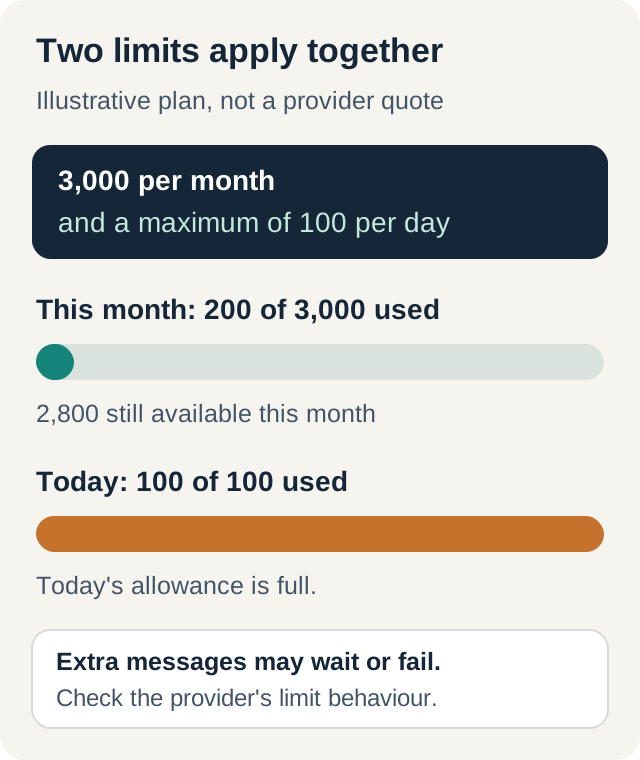
Start with messages you will act on, then add useful confirmations. A fault that repeats every minute can exhaust a quota much faster than a normal week of backups. Check the provider's dashboard and reduce repeated notifications at their source rather than relying on spare credits forever.
Proxmox's direct SMTP destination has no queue or retry mechanism if sending fails. That makes temporary rejection and lost connectivity important. A provider's own queue only helps after it accepts the message. This limitation is documented in Proxmox's SMTP section.
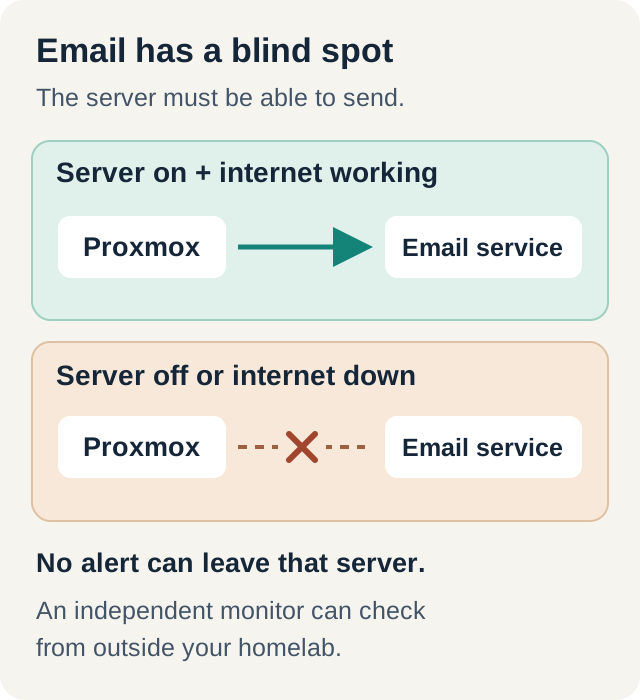
Check the spam folder during testing and inspect the provider's delivery record. Acceptance by the receiving mail service does not guarantee placement in the inbox. Keep occasional test messages and account checks on your maintenance list, especially if you otherwise send only failures. An alert that never appears cannot prove everything is healthy.
Which service should you choose?
Resend wins for the small Proxmox homelab we have focused on: 3,000 monthly messages, up to 100 each day, no production-approval process and 30-day delivery history. You still need a verified domain and a successful test to your inbox. This is our judgement about practical free-plan features, not a measured reliability ranking.
Choose Sender if you need more monthly capacity and can complete its verification. Choose Brevo if 300 daily sends and longer default history fit your needs, while accounting for activation and inactivity rules. SMTP2GO, Mailjet and SendPulse remain practical alternatives with different limits.
Before relying on any of these services, send a test notification from Proxmox and make sure it actually reaches your inbox. Pick a plan with comfortable spare capacity, verify both a test and a real notification, and keep the setup simple enough to maintain. Our homelab maintenance guide puts those alerts alongside backups, updates and recovery checks.